svg-margin: Better Gutters for Emacs
Table of Contents
1. TLDR
Emacs can draw line-level indicators in the built-in fringe and margin, the thin gutters beside the buffer text. The fringe gives you a single monochrome mark per side, and the margin can technically hold more, but getting several independent sources to share one line cleanly is surprisingly hard to pull off in the plain text rendering that the margin uses out-of-the-box.
svg-margin (code on GitHub) fixes this by rendering indicators as SVG in the window margins, so any number of independent "providers" present text, icon glyphs, and clickable markers side by side on one line. Like my svg-line package, it overlays SVGs onto built-in UI components (the margin in this case) by leveraging Emacs's built-in SVG support. My personal config channels many sources to it, including VC, flycheck, evil marks, Org elements, whitespace indicators, and live symbol occurrences.
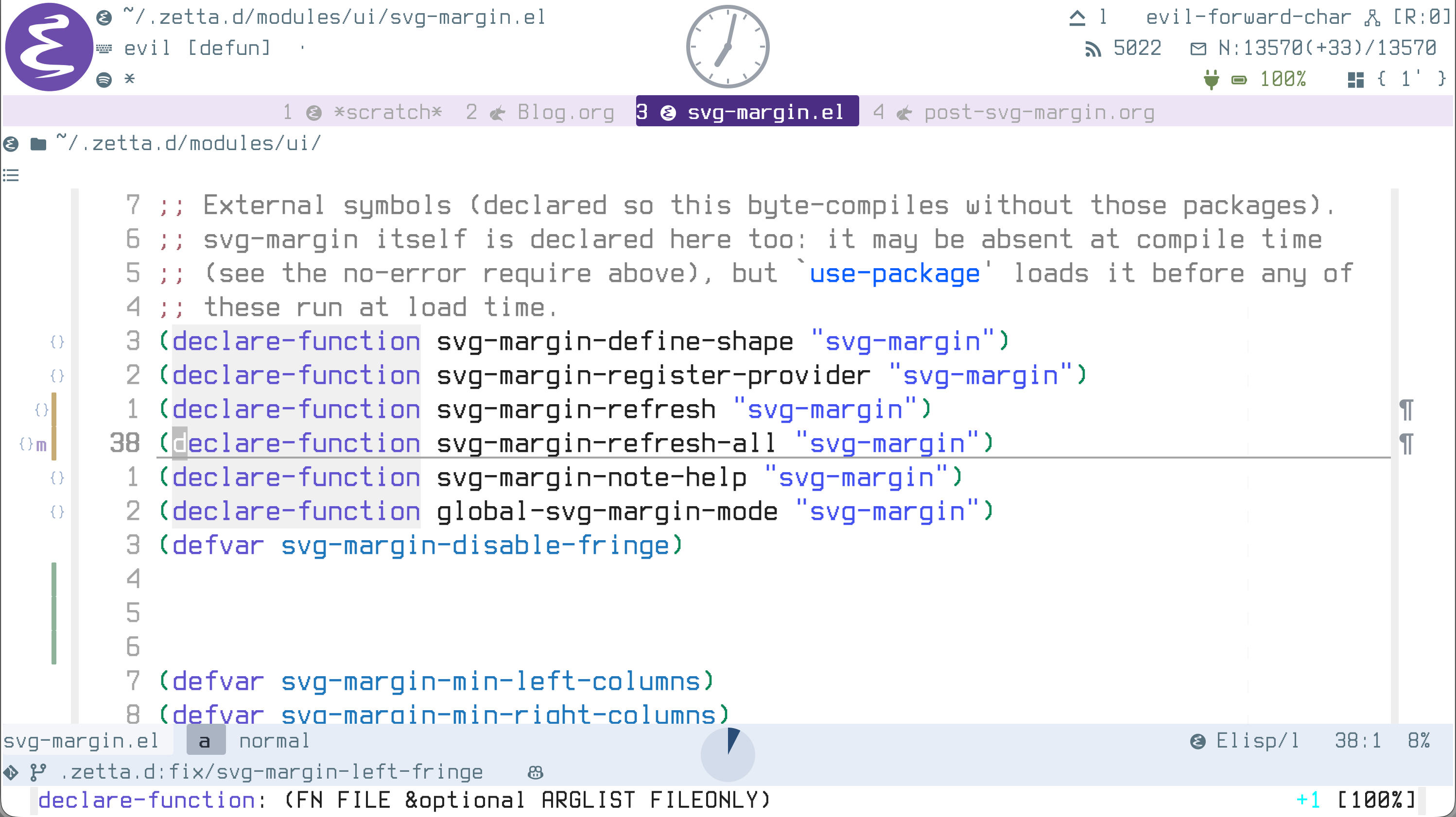
Figure 1: See svg-margin in action (to the left of the grey fringe). Note the lines where there are multiple indicators. On line 38, we have an evil mark (m), a symbol-overlay indicator ({}), and git-gutter. I'm also using the right margin to display a white-space indicator. The margin grows and shrinks to accommodate an arbitrary number of indicators.
2. About
I lean on the fringe and margin heavily because I'm a HUD maximalist, and scanning a buffer's gutter at a glance is almost always faster than parsing the same data out of the buffer's text.
To satisfy my greed for HUD, I yearned for a flexible gutter where any number of independent (that's a key word, remember it) indicator sources can coexist without competition on a given line, and without me having to allocate them to predetermined slots. I want an API that's like "here's a gutter, any package can push pretty indicators to it".
Emacs's fringe can't give me that because it's one monochrome bitmap per side. It's charming in its ugliness, and very useful (arguably necessary) for things like line wrap indicators. It's the Quasimodo of Emacs's UI components: rough around the edges, naive, and loyal.
Emacs's margin is the Esmeralda to the fringe's Quasimodo, and provides a much better stage for the decoupled-indicator-provider vibe I'm going for, mainly because it supports multiple indicators on a given line. But it falls ever so short of my requirements because it lacks a way to compose multiple indicators together.
The main contribution of svg-margin is exactly that missing compositor. It lets you push however many indicators you want into a given margin line, with graceful resizing (over the built-in truncation), and with position priority (for example, so that git-gutter information always renders closest to the buffer's text).
To address an anticipated question: Why use SVG when you can use a compositor like the one defined in svg-margin with the built-in margin? Basically, it works, but it's very difficult to get the built-in margin's text rendering to play nice with pretty glyphs in the multiple-indicator-per-line scenario. As optional reading, you can read more about why in the Why an image, not text section below.
3. svg-margin's Features
- Multi-column packing: several indicators stack side by side on one line, in both margins; the margin grows and shrinks to fit, with no upper bound on the number of indicators per side.
- Decoupled providers: a provider of indicators is a simple function of the buffer returning a list of indicators, so independent packages coexist without conflict.
- Rich indicator style: built-in shapes (dot, ring, bar, box, triangle), centred text, Nerd Font icon glyphs, or a custom
:drawfunction can all be used to render indicators in the margin. - Clickable anything: any indicator can carry a left-click action, a right-click menu, and hover help with a highlight.
- No jitter on buffer switch, text-scale aware: margin widths are buffer-local and indicators resize with
text-scale. This avoids jitter when switching buffers and ugly or truncated repaints, respectively.
4. Configuration
A provider is a function of the buffer that returns a list of indicator plists. As shown below, you simply define the provider, register it with svg-margin-register-provider and then enable svg-margin-mode (or global-svg-margin-mode).
4.1. A simple provider
This example puts a red dot beside every line containing the string TODO:
(svg-margin-register-provider 'todo
  (lambda (_buffer)
    (let (out) ;; out is shorthand for 'output'
      (save-excursion
        (goto-char (point-min))
        (while (re-search-forward "\\_<TODO\\_>" nil t)
          (push (list :line (line-number-at-pos) :shape 'dot :color "#cc3333")
                out)))
      out)))

(svg-margin-mode 1)            ; or (global-svg-margin-mode 1)
The provider (that lambda) returns a list of indicator plists, each with a position (:line or :pos), a :shape, and a :color. svg-margin-mode enables the gutter in this buffer.
4.2. Decoupled providers
The real point of providers in svg-margin is that they are decoupled (or independent). In this example, three separate ones (a VC bar, a lint icon, and an evil-style mark) are registered. Two of them happen to target the same line, and svg-margin gracefully handles packing them into adjacent columns within the margin:
;; A VC provider: a coloured bar.  Highest priority, so it sits nearest the text.
(svg-margin-register-provider 'vc
  (lambda (_buffer)
    (list (list :line 10 :shape 'bar :color "#8fb39a" :help "added")))
  :side 'right :priority 9)

;; An independent lint provider.  It knows nothing about 'vc, but because it
;; emits an indicator for the same line, svg-margin packs it into the next
;; column over.  This one is a clickable icon with an action and a menu.
(svg-margin-register-provider 'lint
  (lambda (_buffer)
    (list (list :line 10
                :text (nerd-icons-codicon "nf-cod-bug") :font "Symbols Nerd Font Mono"
                :color "#cf9999"
                :help "syntax error"
                :action #'flycheck-list-errors :action-help "list errors"
                :menu '(("Next error" . flycheck-next-error)
                        ("Explain"    . flycheck-explain-error-at-point)))))
  :side 'right :priority 5)

;; A third provider, on the LEFT margin: a letter mark coloured by a face.
(svg-margin-register-provider 'marks
  (lambda (_buffer)
    (list (list :line 25 :text "a" :face 'warning)))
  :side 'left)

(global-svg-margin-mode 1)
- The key take-away here is that three independent providers (
vc,lint, andmarks) never reference each other.vcandlintboth emit for line 10, sosvg-marginpacks them into adjacent columns of one image, ordered by:priority(vcwith priority9is rendered nearest the text, andlintwith priority5is rendered next outward). :side/:prioritypassed toregister-providerare defaults: they add these keys for any indicator that doesn't set them.:text+:font: a string drawn centred. Note that when you use a Nerd Font, the text can be a glyph.:faceuses a face's foreground instead of a literal:color.- The
:action(left-click action) /:action-help(hover-over) /:menu(right-click context menu) keys turn an indicator into a button.
4.3. Reclaiming the fringe
Because a provider just reads data, you can move what a package draws in the fringe into the margin (with one practical exception). For example, here are evil's marks, which display in the fringe by default, mirrored into the left margin:
(setq svg-margin-disable-fringe 'left)   ; reclaim the left fringe

(svg-margin-register-provider 'evil-marks
  (lambda (buffer)
    (with-current-buffer buffer
      (cl-loop for (ch . m) in (bound-and-true-p evil-markers-alist)
               when (markerp m)
               collect (list :pos (marker-position m)
                             :text (char-to-string ch)
                             :face 'font-lock-keyword-face))))
  :side 'left)
The provider reads evil-markers-alist and renders each mark's letter at its position.
svg-margin-disable-fringe tells svg-margin to collapse the named fringe (left, right, or both) to zero on each render, so the margin effectively reclaims the evil marks from the fringe's space. This is also how my config moves git-gutter, flycheck, and evil marks off the fringe into the better gutter provided by svg-margin.
5. Why an image, not text
This is optional reading for those curious as to why SVG is justified in this case.
Packing several independent indicators into one built-in margin line has two challenges, one compositional (already solved by the compositor), and the other graphical.
With the built-in margin displaying multiple indicators per line, I found that pixel-exact layout in text is a losing game. In the built-in margin, indicators are laid out as characters. The margin is reserved in whole character columns, but text glyph advances (e.g. for Nerd Font icons) don't divide evenly into them, and I found that this became worse at fractional text-scale. The challenges that arose for me from this char advance inconsistency:
- Text clipping: the rendered content runs slightly past the reserved width and the outermost marker is cut off at the margin's edge.
- Horizontal jitter: glyph advances vary, so when one indicator appears or disappears, its neighbours shift by a sub-pixel.
- Line-height growth: Nerd-Font icons often raster taller than the text line and stretch it, and trying to trim their height to fit shrinks their character advance below a character, which reintroduces the jitter issue.
I'm sure it was possible to get around this, but I had to add enough code to account for these issues that the simple compositor-only implementation quickly outgrew the compositor-plus-SVG implementation.
The reason SVGs are easier to work with is that an image has an exact, author-controlled pixel width. I found there were no issues handling character advances, no clipping, no jitter, no line-height problems, and that the SVG-based approach worked at any text-scale.
6. Caveat: line-wrap indicators stay in the fringe
One thing you can't pull into the margin is the line-wrap (continuation) and visual-line arrows. I tried this for a while, and to my surprise, I couldn't get it to work.
The reason is that those arrows are drawn by Emacs's redisplay engine per screen row as it lays the buffer out. When a long line spans several screen rows, each wrapped row gets one line-wrap indicator. Margin content, by contrast, is anchored to a buffer position, and renders on the single screen row that contains that position.
The points where a line wraps are not buffer positions, and I found that they're actually decided at display time from the window's width and font. So with the margin, there is nothing to anchor a marker to on the second visual row, short of recomputing the line-breaking yourself (reimplementing part of redisplay), which I don't think is worth the squeeze. After all, the fringe already does this well.
7. Note on Inspiration
svg-margin is the gutter sibling of svg-line. Both grew out of the same realization that Emacs's native SVG support, which Nicolas Rougier's explorations showed could stand in for so much of the display engine, applies just as well to the margins as to the status bars. Where svg-line rebuilt the *-lines, svg-margin rebuilds the gutter.