A Tree and a Server Walk Into a Core…
Table of Contents
1. TLDR tldr

Two technologies have endowed every editor with IDE superpowers this past decade: tree-sitter, a generic incremental parser that gives your editor a live syntax tree of your code, and the Language Server Protocol (LSP), a generic client-server protocol that gives your editor code intelligence features like linting, type-checking, auto-completion, and code navigation. Each one replaces an M×N fan-out of per-language, per-editor hacks with a single, language- and editor-agnostic protocol. Emacs has merged support for both into its core, and shipped them in Emacs 29.1 (three years ago this month!). This post explains what each one does, visualizes a real-life tree-sitter parse tree, and recounts how both technologies made their way upstream into the glorious Emacs core.
An interactive visualization of the syntax tree tree-sitter builds from a small Python module — hover any node for details, click to zoom into a subtree. Two more of these live further down the post.
2. About emacs carnival programming
This is my entry for July's Emacs Carnival, hosted by Andy over at Plain DrOps. The theme is Programming, i.e. Emacs as a programming environment. I've done these before (May was about deep Emacs patterns, June about Emacs teaching you Emacs), and this month I want to push back on my least favorite meme: that Emacs is arcane; rusty and dusty; old news; the "Editor for Middle Aged Computer Scientists".
Emacs has been under active development by a growing number of contributors, and is surprisingly modern. As two language-agnostic protocols for IDE features arose (tree-sitter for syntax and LSP for semantics), Emacs developers quickly merged support for both into core. More interestingly, they made them usable in the editor by integrating them into the Emacs machinery that predates them by decades.
The first suggested topic in the carnival is "Language Specific Setups" and, given the utility of tree-sitter and LSP, I couldn't help but misinterpret this suggestion intentionally and create a post on my "Language Generic Setup".
3. The Combinatorial Woes of M×N leverage architecture
Traditionally, in most IDEs "support for language X" meant one implementation per editor, per language.
Syntax highlighting was a mixed bag of regular expressions that approximated the language's grammar.
Navigation ("jump to the function I'm in") was basically regex guesswork. Completion and go-to-definition, if they were even available, came from language-specific plugins of wildly varying quality.
With M editors and N languages, the world had to write (and maintain, and debug) M×N of these plugins. The modern fix is the classic programmer's reflex of establishing a generic layer, or protocol, in the middle, and paying a much more affordable M+N tax instead (the framing the LSP community itself uses).
This reflex is older than any editor in the diagram below, by the way. It's the UNCOL argument from 1958, which suggested putting one universal intermediate language between M source languages and N machines, and M×N compilers become M+N. UNCOL itself never shipped, but its argument became the standard justification for compiler intermediate representations, and the argument is just as valid for editor tooling.
graph TB
    subgraph before["Before: every editor reimplements every language (M × N)"]
        direction LR
        A1[Emacs] --- B1[Python]
        A1 --- B2[Rust]
        A1 --- B3[TypeScript]
        A2[Vim] --- B1
        A2 --- B2
        A2 --- B3
        A3[VS Code] --- B1
        A3 --- B2
        A3 --- B3
    end
    subgraph after["After: one generic layer in the middle (M + N)"]
        direction LR
        C1[Emacs] --> MID(("tree-sitter<br/>+ LSP"))
        C2[Vim] --> MID
        C3[VS Code] --> MID
        MID --> D1[Python grammar & server]
        MID --> D2[Rust grammar & server]
        MID --> D3[TypeScript grammar & server]
    end
    before ~~~ after
Tree-sitter provides the answer to "what is this text, structurally?" — it can tell the editor that characters 4 through 7 are a function name. LSP provides the answer to "what does this text mean, in this project?" — it knows that the function is defined in another file, is called from twelve places, and is missing an argument, etc…. These two layers solve "syntax and semantics" in a graceful, reusable way.
4. Tree-sitter: a Fresh Parse Tree on Every Keystroke treesitter parsing
Tree-sitter, started by Max Brunsfeld while working on Atom at GitHub, is a parser generator plus an incremental parsing library. Rather than implementing a boat-load of regular expressions, you provide tree-sitter with a language's grammar, tree-sitter compiles it into a small C library, and any tool can then parse that language. Each grammar is its own small repository. The canonical ones live under the tree-sitter GitHub org (e.g. tree-sitter-python, the grammar behind every tree in this post), and the community maintains a list of hundreds more.
Compilers typically wouldn't work well for providing live feedback in the text-editing use case, but there are two properties that make tree-sitter performant and robust enough to be editor-grade:
- It's incremental. When you type a character, tree-sitter doesn't re-parse the file, but rather patches the existing tree in microseconds. The result is that you have an up-to-date parse tree, immediately, on every keystroke.
- It's error-tolerant. Code being edited is malformed almost all of the time, because you are mid-keystroke more often than not. Tree-sitter handles this gracefully and keeps the rest of the tree intact instead of failing at the first syntax error.
These aren't new ideas so much as ideas finally made practical. The figure below comes from the 1998 Berkeley dissertation that inspired tree-sitter's development, and it shows the incremental trick. As an edit arrives, the parser restores a consistent tree by creating just two new nodes (black) and adjusting a handful of others (gray). Every other node in the tree is reused as-is. This is a phenomenal paper, by the way, I highly recommend you read it.
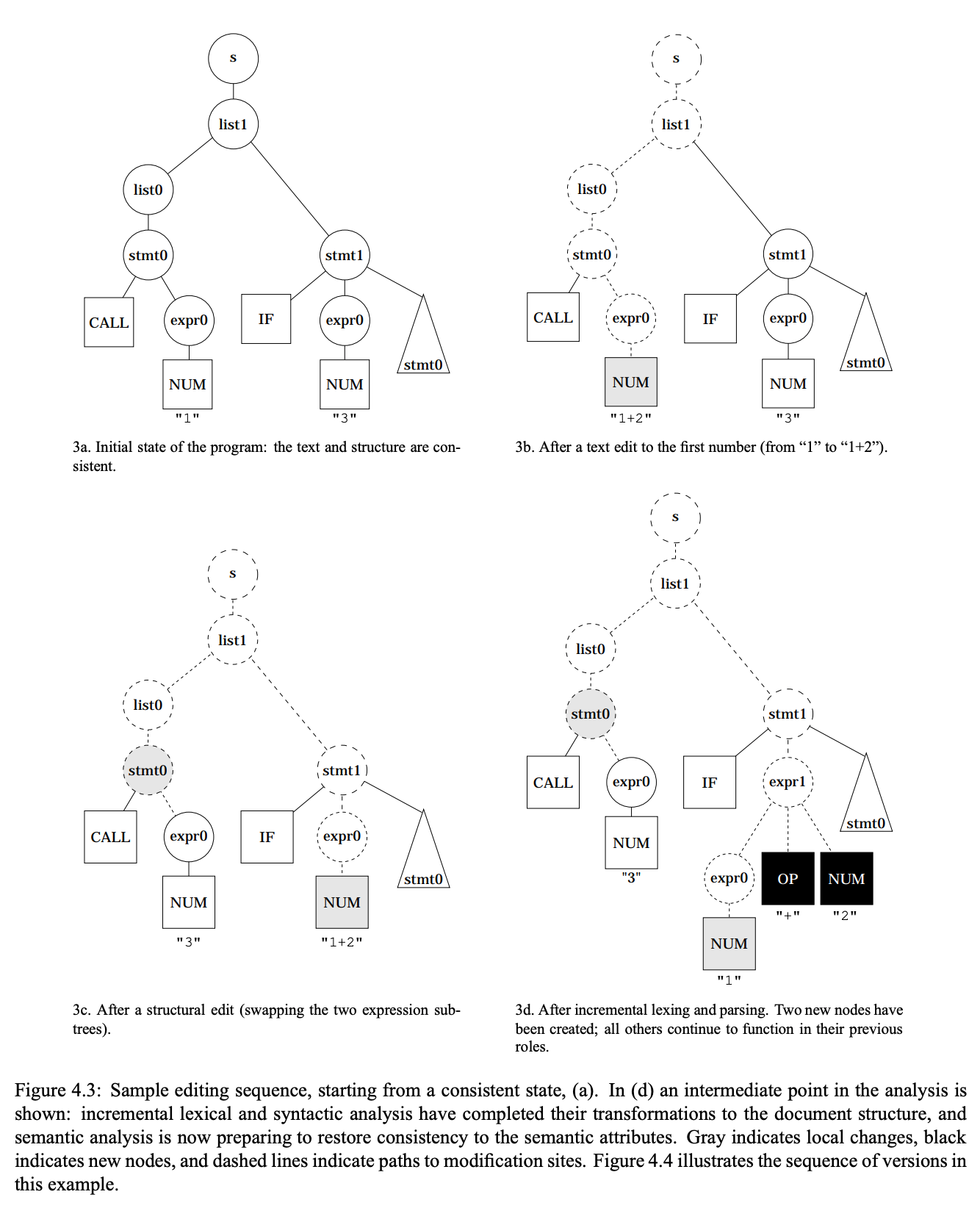
Figure 1: From Tim Wagner's 1998 Berkeley dissertation, Practical Algorithms for Incremental Software Development Environments (his Figure 4.3), the work tree-sitter's incremental parsing builds on. Dashed lines are the paths walked to reach the edit site.
4.1. Looking at Concrete Trees
You'll most often hear these trees called Abstract Syntax Trees (ASTs). Tree-sitter's own docs use the term, but strictly speaking, tree-sitter produces a concrete syntax tree (CST). While an AST discards everything that stops mattering once the structure is known (keywords, parentheses, punctuation), a CST keeps every last token of the source. Editors need the concrete version, because you can't highlight a def you've thrown away. You'll see this in the charts below, where the keyword and punctuation tokens appear in the tree, in gray.
Here I show a few examples, in order of increasing complexity, of the syntax trees that tree-sitter actually produces from Python code.
There are many ways to visualize these trees. Mine are drawn with plotly as an icicle chart. Each tile is a node in the tree. A tile's width is proportional to the amount of source code the node covers, and its children sit beneath it. Color encodes the node's role in the code. These charts are interactive and fun to play with (which is why I created three examples!). You can hover over any tile to see the node type and the exact source bytes it covers, and you can click a tile to zoom into its subtree (the breadcrumb bar that appears on top zooms you back out).
4.1.1. Fibona-tree
Here's everyone's favorite, flogged-to-death fibanacci function:
def fib(n):
    if n < 2:
        return n
    return fib(n - 1) + fib(n - 2)
Here is the tree that tree-sitter produces.
Notice how the tree covers the text completely. Even def and each ( get a node — remember, that's the concrete in "concrete syntax tree". Any syntactical question or request the editor has ("am I inside a function?", "select the whole if statement", "highlight this as a parameter") can be answered by querying this tree.
Something I love about Emacs's support for this is that you don't need my chart to see these trees concretely. In Emacs 29+, you can open any *-ts-mode buffer and run M-x treesit-explore-mode. Then Emacs shows you this same live tree and highlights the node at point as you move. In this way, and very much in the spirit of last month's post on discoverability and introspection, Emacs can show you its own parse trees.
4.1.2. Scaling Up: quicksort
Here's a more complicated tree for a quicksort algorithm, implemented using list comprehensions, which are not as intuitively tree-like:
def quicksort(xs):
    if len(xs) <= 1:
        return xs
    pivot, rest = xs[0], xs[1:]
    lo = [x for x in rest if x < pivot]
    hi = [x for x in rest if x >= pivot]
    return quicksort(lo) + [pivot] + quicksort(hi)
There are two things worth noticing as you play with this tree. First, each list_comprehension is a single expression node that contains an entire clause structure (a for_in_clause and an if_clause). In this way, the editor's request to "select the whole comprehension" is one node-hop, rather than a text scan for matching brackets. Second, notice the tree got wider but not much deeper than fib's. Expression-heavy Python fans out horizontally.
4.1.3. Zooming Out: a Whole Module
Here's the typical form of an entire (albeit short) module in Python.
import math
from dataclasses import dataclass


@dataclass
class Point:
    """A point in the plane."""

    x: float
    y: float

    def distance_to(self, other):
        return math.hypot(self.x - other.x, self.y - other.y)


def centroid(points):
    n = len(points)
    return Point(
        sum(p.x for p in points) / n,
        sum(p.y for p in points) / n,
    )


def nearest(points, target):
    return min(points, key=target.distance_to)
Look at the second row and you will see import_statement, import_from_statement, decorated_definition, function_definition, function_definition. That row is your file outline, and it's what Emacs tools like imenu, which-function-mode, and code folding query from the tree. Every structural feature your editor offers over this file starts from some node in this picture. When your editor "expands the selection to the enclosing expression", it is literally walking one row up this diagram.
This brings us to the tools that do exactly that.
4.2. What Emacs Does with the Tree fontlock
With a live tree in hand, the classic per-language hacks become generic one-liners over nodes:
- Highlighting (
font-lock) becomes precise. Regexes were always fine when the answer sits inside the match (def foois a definition, thedefis right there), but they fail when it doesn't. Highlighting the uses of a parameter inside a function body, or distinguishing a C declaration from a call, requires structure and scope, and matching nested structure is provably beyond regular expressions. Classic highlighters approximated this detection with stacks of context rules, but with a tree, those distinctions are just node types. - Navigation and selection by type: you can easily jump to the enclosing function, next class, or previous statement, because the tree knows the exact bounds of everything, whether you're reading finished code or still typing it out.
- Indentation, folding,
imenuall subsist on the same structure, the syntax tree.
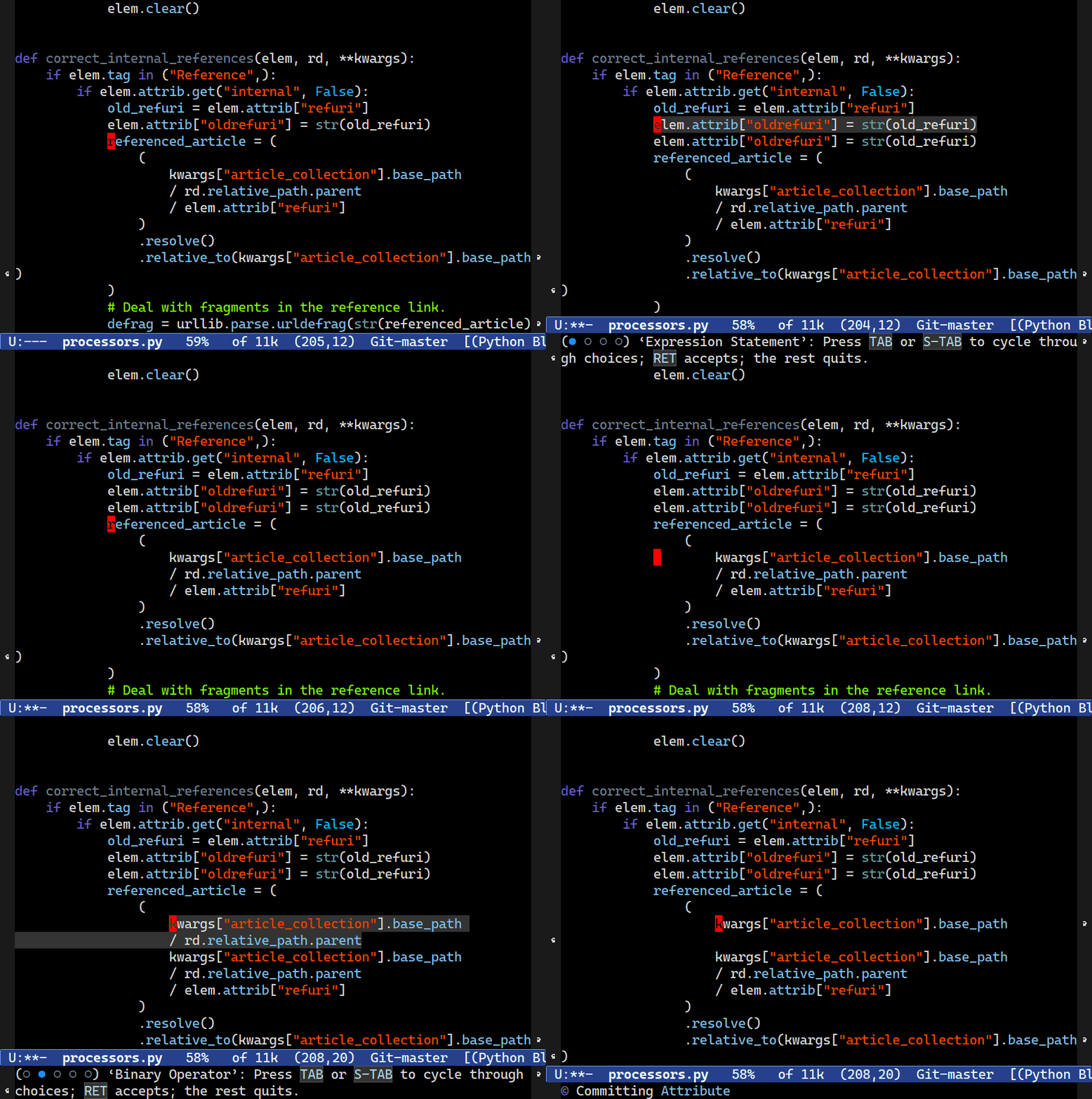
The showcase for navigation is Mickey Petersen's Combobulate, built on Emacs's built-in treesit library. It gives you structural editing across Python, TypeScript, Go, YAML, and more. It ships with commands for expanding the selection node-by-node, dragging whole siblings up and down, hopping between parameters or list elements, placing cursors on every matching node, and many more. It also has wonderfully guiding transient menus, making Combobulate a phenomenal way to learn a language's structure too.
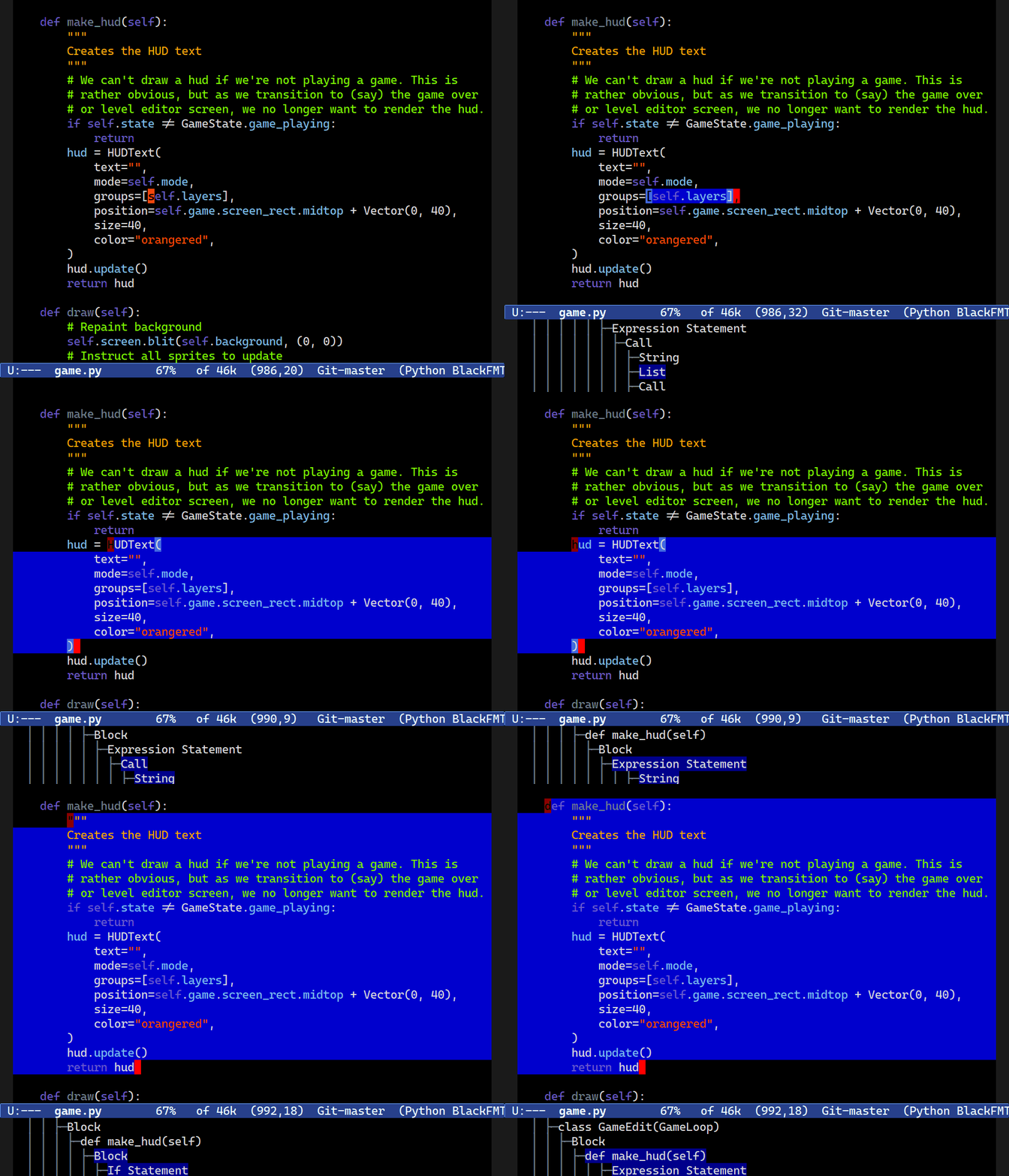
Expand the selection node-by-node — one row up the icicle charts above
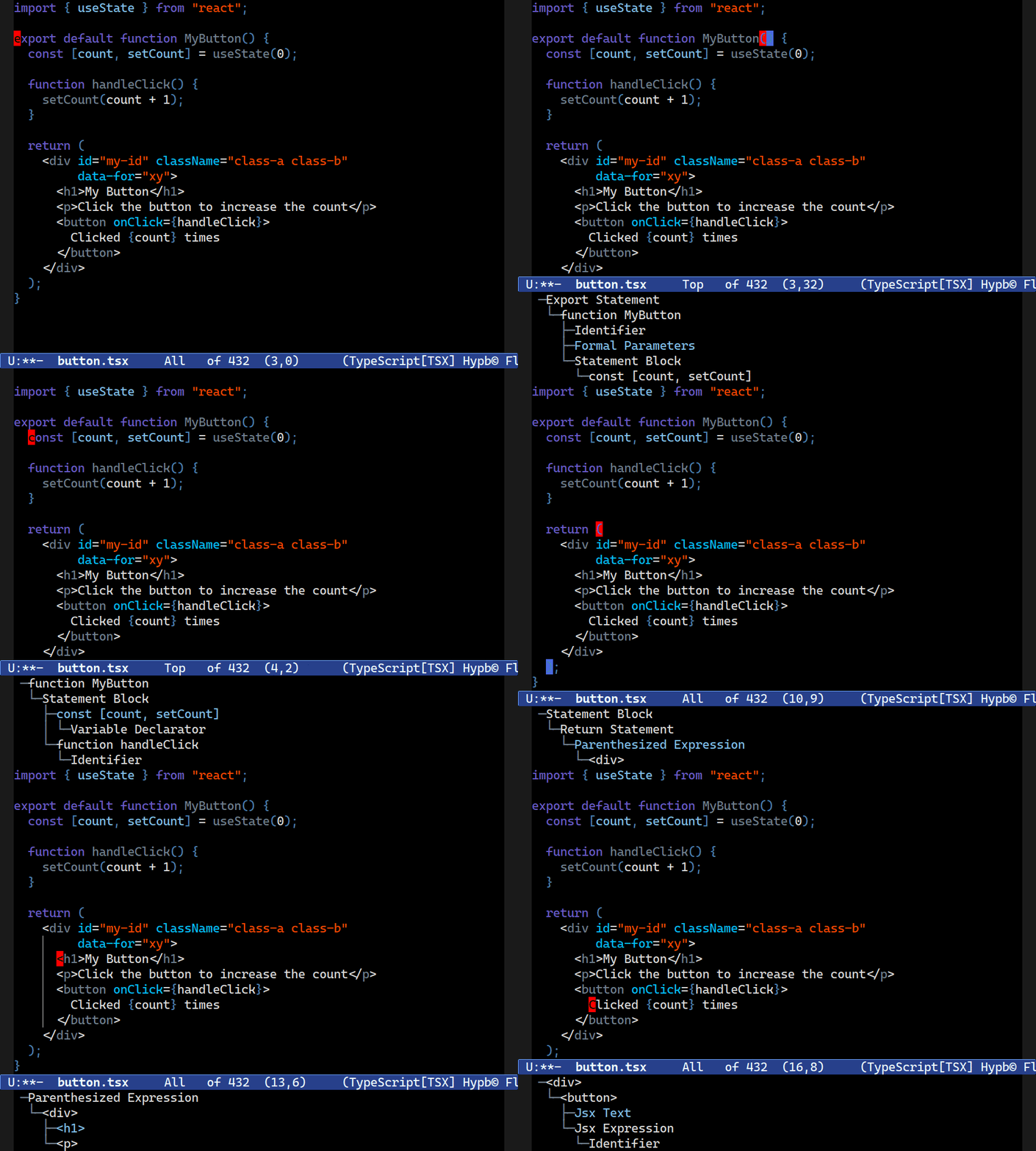
Hop between sibling nodes (here in JSX)
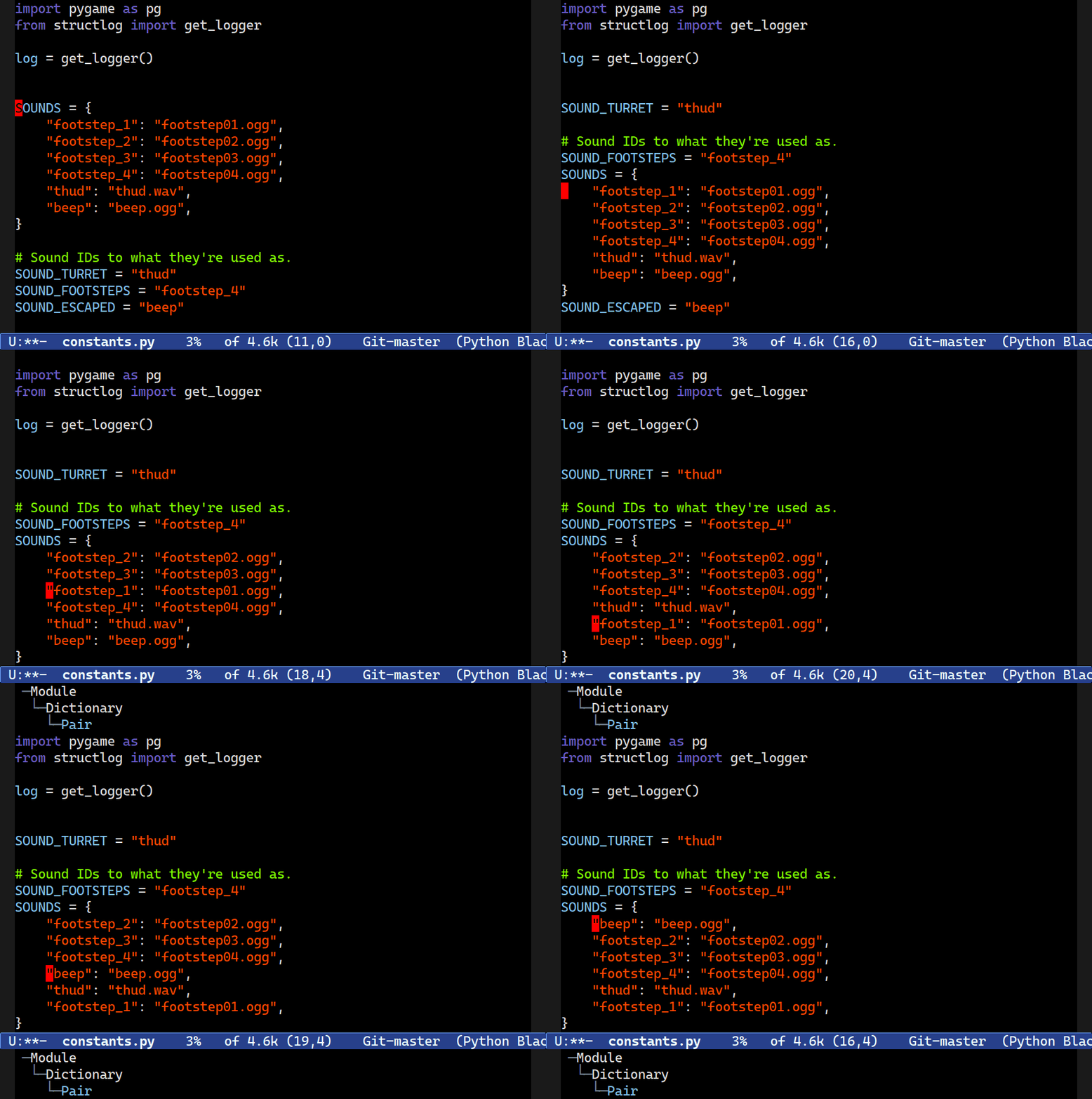
Drag whole siblings up and down
Clone the node at point
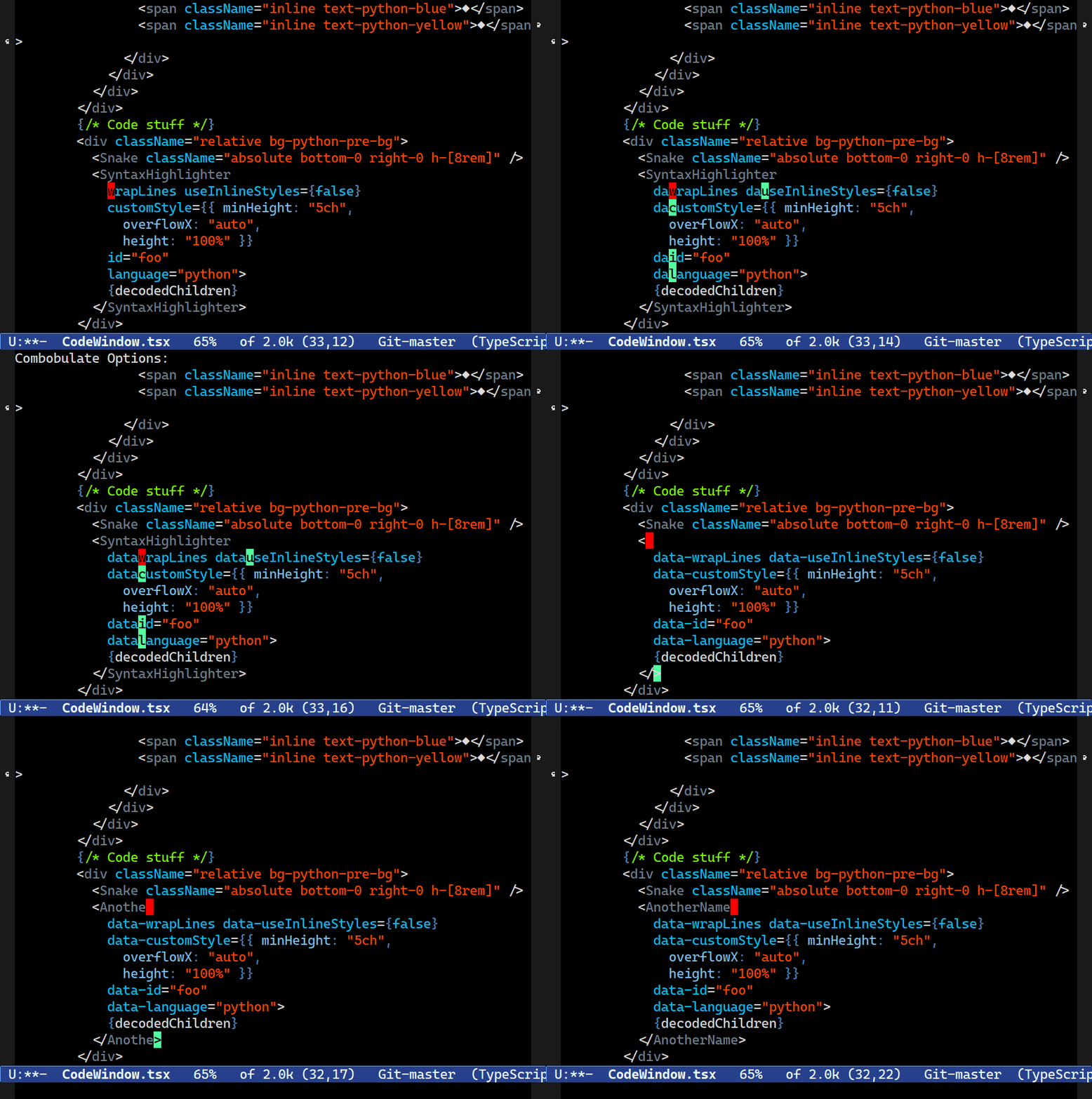
Place cursors on every matching node
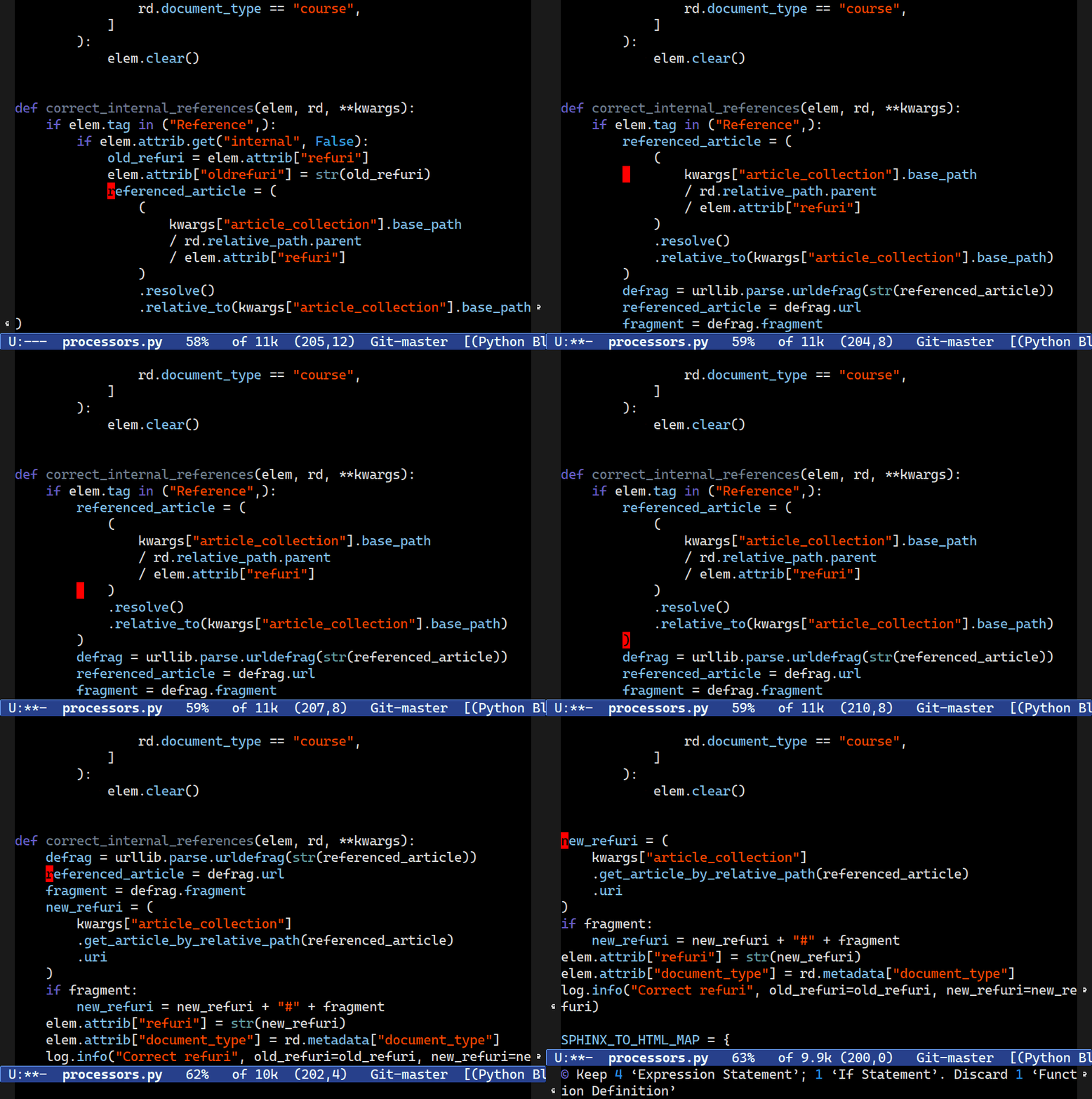
Splice a node up into its parent
Figure 2: Combobulate in action (gifs from the Combobulate repo). Click any gif for a full-screen view.
5. LSP: Tapping a Compiler's Brain lsp architecture
Tree-sitter knows your file's structure, but it doesn't know your project. "Where is this function defined?", "where is it called?", "what's this variable's type?". Answering those questions requires language analysis, the front half of a compiler (front half meaning the parsing, name resolution, and type checking, without the code generation).
The Language Server Protocol, published by Microsoft in 2016 for VS Code, solves this with the same M+N trick, outside of the editor. The language and project intelligence lives in a standalone server process (pyright, rust-analyzer, clangd, gopls, …), and the editor talks to it over JSON-RPC. Your editor is a client of the language server.
sequenceDiagram
    participant E as Emacs (eglot)
    participant S as Language server (e.g. pyright)
    E->>S: initialize (what can you do?)
    S-->>E: capabilities (completion, definitions, rename, ...)
    E->>S: textDocument/didChange (user typed something)
    S-->>E: textDocument/publishDiagnostics (line 12: type error)
    E->>S: textDocument/definition (M-. on a symbol)
    S-->>E: Location (utils.py, line 48)
Any editor that can speak this protocol (the Language Server Protocol) is provided with completion, go-to-definition, find-references, rename, hover documentation, and on-the-fly diagnostics for every language that has a server. Because the language servers follow a protocol, integrating these intelligence features across languages is easy. The server is usually written by the people who know the language best, often the compiler team itself.
5.1. Eglot: LSP, the Emacs way eglot builtins
Emacs's built-in client is João Távora's Eglot ("Emacs polyGLOT", started in 2018). What makes Eglot special is how it uses Emacs machinery that has already existed for decades to integrate with these language servers.
| LSP capability | Served via |
|---|---|
| Go to definition | xref |
| Hover docs | eldoc |
| Diagnostics | flymake |
| Completion | completion-at-point |
| Symbol outline | imenu |
| Project boundaries | project.el |
M-x eglot in a programming buffer is genuinely all it takes to start using a language server, and these Emacs tools you've probably already used will work, but with richer information provided by the language servers.
The coolest part of this integration story is that Emacs honored a modern protocol by adopting it, and Eglot honored Emacs by expressing that protocol through Emacs's native idioms. Adopting the power of LSP didn't mutate Emacs in any significant way. It just added one package integrating LSPs with the existing Emacs machinery.
6. The Road Into Core history upstream
Both tree-sitter and LSP support followed a similar path into Emacs, where external experimentation proved the concept and value, and then the core maintainers did the hard work of making it native.
timeline
    1998 : Wagner's Berkeley dissertation works out incremental parsing for editors
    2013-2017 : Max Brunsfeld develops tree-sitter at GitHub for Atom
              : Microsoft publishes LSP (2016) — lsp-mode brings it to Emacs (2017)
    2018-2020 : Eglot appears as an external package (João Távora)
              : elisp-tree-sitter binds tree-sitter to Emacs via dynamic modules (Tuấn-Anh Nguyễn)
    2022 : October — Eglot merged into Emacs core
         : November — Yuan Fu's native tree-sitter integration (treesit.el) merged
    2023 : July — Emacs 29.1 ships both, plus python-ts-mode, c-ts-mode, and friends
Tree-sitter merged in November 2022, weeks after Eglot's October merge, and Emacs 29.1 (July 2023) shipped them together with a family of *-ts-modes and M-x treesit-install-language-grammar. Emacs 29.1 was a landmark release because it delivered modern, language-agnostic syntax highlighting and code semantics in one fell swoop.
7. Try It handson
On Emacs 29 or later, no packages required:
;; fetch + compile the grammar
M-x treesit-install-language-grammar RET python RET
;; tree-sitter highlighting
M-x python-ts-mode
;; watch the live parse tree
M-x treesit-explore-mode
;; connect to a language server
M-x eglot
(For eglot you'll need a server on your PATH, e.g. pip install pyright. To make the ts modes the default, see major-mode-remap-alist.)
treesit-install-language-grammar clones a grammar repository and compiles it for you. If the language isn't already listed in treesit-language-source-alist, Emacs prompts for the repository and pre-fills the canonical guess, https://github.com/tree-sitter/tree-sitter-<language>. For anything more exotic, pick a repository from the community's list of parsers.