Juneau Something? Emacs Teaches You How to Fish!
Table of Contents
- 1. TLDR tldr
- 2. About emacs carnival builtins
- 3. The Strange Loop (the Fish that Teaches Fishing) thesis recursion
- 4. "Where Do I Even Start?" help tutorial
- 5. "What Did I Just Do?" introspection history
- 6. "What's Under my Cursor?" introspection eldoc
- 7. "What Can I Do Right Now?" discoverability keys
- 8. "What is this Thing?" help apropos
- 9. "Where Can I Read More?" info documentation
- 10. "How Does it Actually Work?" source xref
- 11. "Let Me Just Try It" eval repl
- 12. "Where Are the Levers?" customize config
- 13. The demo: fishing for games 🎣 demo games
- 14. A Brief Bubble on Graphs
- 15. Reprise: what the slogans actually mean thesis
- 16. A closing remark
1. TLDR tldr

The folks who 'grok' Emacs aren't wizards. They don't learn Emacs, per se, but instead they learn the handful of built-in commands for asking Emacs about Emacs. Those same commands work on themselves, so once you know them you can teach yourself everything else you need to know about Emacs. This post tours that machinery (the C-h help family, apropos, Info, xref, describe- and friends) by following the questions a curious beginner typically asks, and ends by fishing a built-in game out of Emacs and reading its source with that machinery. Emacs teaches itself in this way. In other words, Emacs doesn't give you a fish, it teaches you how to fish!
2. About emacs carnival builtins
Give a person VSCode, and you feed them for a day.
Give a person Emacs, and you feed them for a lifetime.
My memory is always hazy with quotes like this, but if my memory hasn't failed me this time, this is a century-old proverb about the fortitude of learning craft over the weakness of receiving crafts. Some nagging feeling tells me the proverb was about fish, but I digress….
This post is my entry for June's Emacs Carnival (hence the punny title), whose theme is Underappreciated Emacs built-ins. I did one for May too, where I rambled about the deeper patterns that make Emacs powerful. This month I want to be more concrete and practical, because the built-in feature I most want to celebrate is the one that teaches all others. Yes, I'm about to flog the dead unicorn of Emacs's autodidactic nature.
Whenever you hear an Emacs elevator pitch, or a response to an overwhelmed beginner's question of "where do I even start?", you'll hear some configuration of the following phrases:
- "Everything in Emacs is introspectable"
- "Emacs discoverable"
- "Emacs is an autodidact" (a lovely phrasing I'm borrowing from Prot)
- "Emacs is self-documenting"
Although true, they're all slogan-ish and platitude-inal, and slogans tend to slide off an Emacs newbie like water slides off a fish.
So this post (and the companion video below) is my attempt to show the built-in machinery that lets Emacs teach itself to new and veteran users alike. Keeping honest with the theme of June's Emacs Carnival, this all runs from bare emacs -Q, and so that's how I'll demonstrate it.
Something I hope you appreciate after reading (or watching) is that these auto-discovery features can make learning Emacs an engaging adventure game. Emacs is the map, you are the intrepid Zoombini-esque adventurer, and Emacs's auto-discovery feature set is your 'navi'.
As this is part of a blog carnival, unlike my typical more clinical posts the prose here-in will be whimsical and silly, and filled with a gratuitous number of fish and maritime puns. If you don't like that vibe, you can skip reading, and go fish yourself 😜. I'm only be partially cheeky there. If you want to bounce, just type C-h C-h and read the buffer that shows up.
But if I've hooked you, ready your tackle box and settle in for some serious schooling.
3. The Strange Loop (the Fish that Teaches Fishing) thesis recursion
If you were hoping for something like M-x go-fish, guess again.
This trick is fascinating to me, and I think it's the most illustrative vignette of Emacs's autodidactic nature. Open emacs -Q, and type:
C-h k C-h k
The first C-h k runs describe-key, which says "press a key and I'll tell you what it does." The second C-h k is the key you press that you want a description for. So describe-key describes describe-key. I do apologize for the recursive prose, but it's the kernel of this whole idea.
When you do this, Emacs displays a *Help* buffer explaining describe-key:
C-h k runs the command describe-key (found in global-map), which is an
interactive native-comp-function in ‘help.el’.

It is bound to C-h k, <f1> k and <help> k.
It can also be invoked from the menu: Help → Describe → Describe Key
or Mouse Operation....

(describe-key KEY-LIST &optional BUFFER)

Inferred type: (function (&optional t t t) t)

Display documentation of the function invoked by KEY-LIST.
KEY-LIST can be any kind of a key sequence; it can include keyboard events,
mouse events, and/or menu events.  When calling from a program,
pass KEY-LIST as a list of elements (SEQ . RAW-SEQ) where SEQ is
a key-sequence and RAW-SEQ is its untranslated form.

While reading KEY-LIST interactively, this command temporarily enables
menu items or tool-bar buttons that are disabled to allow getting help
on them.

Interactively, this command can’t describe prefix commands, but
will always wait for the user to type the complete key sequence.
For instance, entering "C-x" will wait until the command has
been completed, but ‘M-: (describe-key (kbd "C-x")) RET’ will
tell you what this prefix command is bound to.

BUFFER is the buffer in which to lookup those keys; it defaults to the
current buffer.

  Probably introduced at or before Emacs version 22.1.
As you can see, that *Help* buffer has a line like "describe-key is an interactive compiled Lisp function in help.el", and help.el is a link to the file implementing describe-key. Click it (or hit RET on it) and Emacs takes you directly to the source code of the function you just 'described'.
The surface value of this trick for beginners is that you can immediately get the docs and source code links for any command you type in, solving the mysteries created by folks telling you to "C-x [x] to do [blank]". The deeper value of this trick is that Emacs is loopy in its autodidactic way, because you can literally read how the thing that explains things explains things.
For more depth, realize through this answering of the question "what does C-h k do" that every door in Emacs opens into a room that contains not only a description of that door, but links to and descriptions of the other doors leading out of and into that room (see my commentary on graphs).
Even with this single trick, you realize that you don't really "learn Emacs". Instead, you learn the small set of commands for asking Emacs about Emacs. These aren't solid analogies, but Hofstadter might call it a strange loop, and alchemists might draw this as an Ouroboros (a self-cannabilizing snake). I'm clowning at a carnival right now, so I'll call Emacs a fish that teaches fishing 🎣.
The rest of this post is organized around the questions a curious Emacs autodidact can ask, in roughly the order they would ask them. Watch for the loops and edges, as every tool below can be pointed back at itself (loops), and every answer to a question elucidates the relationships (edges) between that answer and the related Emacs goodies.
4. "Where Do I Even Start?" help tutorial
The single most important key in Emacs is C-h (Help). If you remember nothing else, remember that C-h is the universal "explain this" prefix, and that you can ask the help system for help about the help system.
| Key | Command | The question it answers |
|---|---|---|
C-h C-h |
help-for-help |
"What are all the C-h options?" (help on help) |
C-h t |
help-with-tutorial |
"Walk me through the basics, hands-on." |
C-h r |
info-emacs-manual |
"Open the full Emacs manual." |
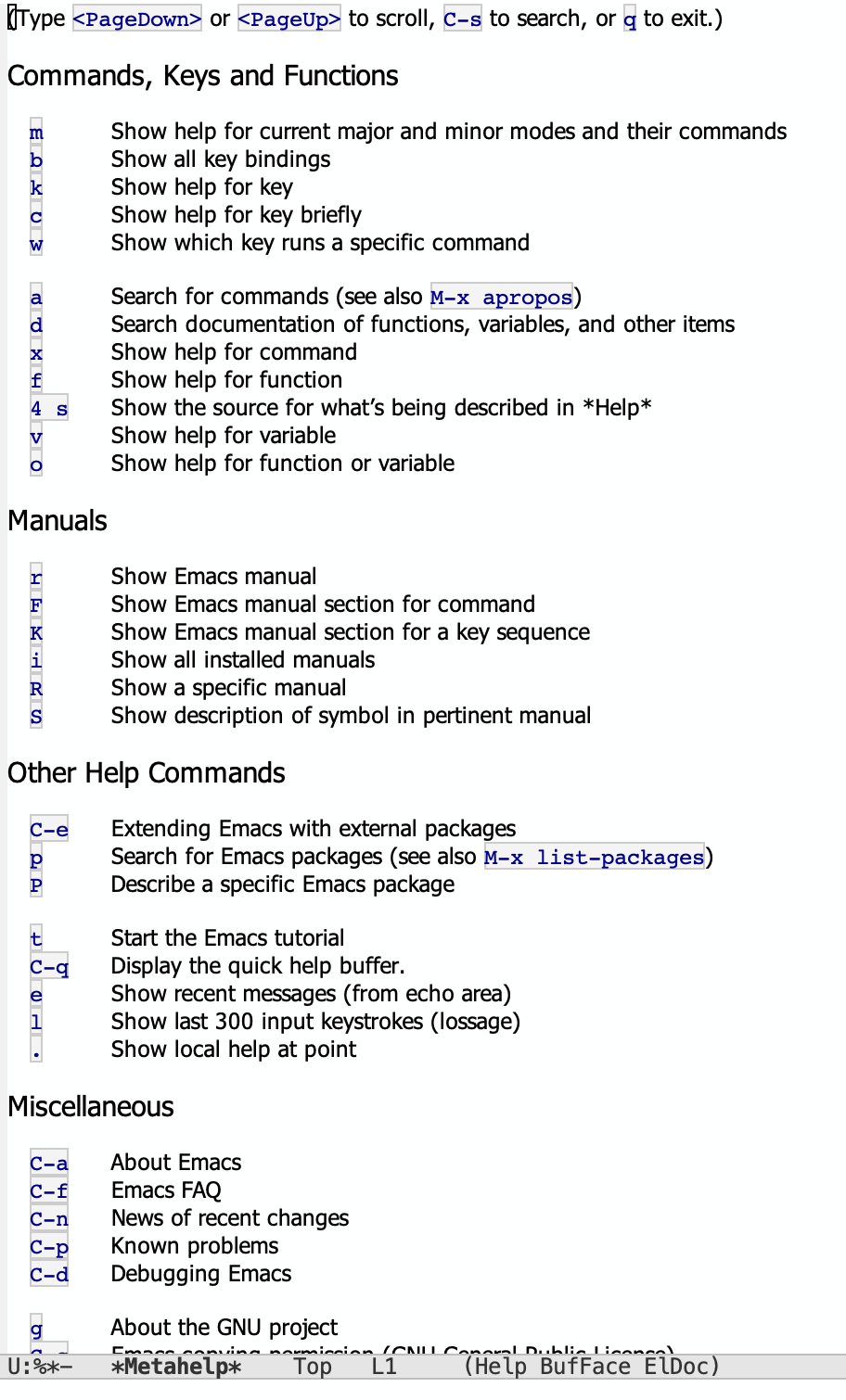
The first thing you should do is press C-h C-h. This will show all variants of "help with this [thing]". Sorry for more graph-speak, but in my opinion this is the entry node to the vast Emacs network. The C-h k for "help with this key" is only one of the many 'things' you can get help with. See what this looks like in the image to the right.
The second thing you should do as a newcomer wading into Emacs is to press C-h t, which takes you through the tutorial, an interactive buffer that teaches the basics of movement and editing. This is the most literal "autodidact" feature.
A useful shortcut to the Emacs manual is C-h r, a mnemonic keybinding for 'reeling' in the full Emacs manual 😉.
5. "What Did I Just Do?" introspection history
A huge amount of Emacs learning happens retroactively. You follow a tutorial, reddit comment, or README and press some keybindings to make magic happen (that's the fish), and then you want to learn what that invocation was and how it worked (that's the fishing).
| Key | Command | The question it answers |
|---|---|---|
C-h l |
view-lossage |
"What were my last ~300 keystrokes?" |
C-x ESC ESC |
repeat-complex-command |
"Show me the Lisp of the last command I ran." |
C-h e |
view-echo-area-messages |
"What has Emacs been telling me?" (the *Messages* log) |
view-lossage is like a flight recorder. It replays your recent keys so you can reconstruct "what did I press to make that happen?", or more likely in the early days of frustration "what in the ever-loving FISH was that?".
My favorite command here is repeat-complex-command (C-x ESC ESC). Any command that read input from the minibuffer gets stored as an honest-to-goodness Lisp form, and you can see any one of these by using repeat-complex-command. For example, if you run a query-replace, then hit C-x ESC ESC, Emacs literally shows you the executed (query-replace "foo" "bar" nil ...) lisp code that you composed when you ran that query-replace command. So, not only can Emacs tell you what command you ran (view-lossage), it can also tell you exactly what Lisp was produced as a result of your interaction post-command-invocation (repeat-complex-command).
*Messages* (C-h e) is probably my most used trick. Everything that flashes in the echo area is recoverable with this command. This is especially useful when 1 interaction results in many echo area messages that flash too quickly for you to read them all.
Other editors can't 'show you the receipts' in this way, but Emacs keeps itself nice and auditable with these 3 commands.
6. "What's Under my Cursor?" introspection eldoc
Point (Emacs-speak for the 'cursor') is always sitting on something, and Emacs can describe that something in exhaustive detail (the character, its font, its text properties, etc…).
| Key | Command | The question it answers |
|---|---|---|
| (passive) | eldoc-mode |
"What's the signature/doc of the thing I'm typing?" (live) |
C-h . |
display-local-help |
"Is there context help for the thing right here?" |
C-u C-x = |
what-cursor-position |
"What exactly is this character — codepoint, face, the lot?" |
M-x describe-char |
describe-char |
The full-buffer version of the above. |
C-h m |
describe-mode |
"What modes are active here, and what can they do?" |
Eldoc is a passive but useful member. It's on by default in programming buffers since Emacs 25, and it prints the function signature or variable doc for the thing under point into the echo area.
C-u C-x = and describe-char are like an electron microscope, but for characters instead of electrons. For any character, it tells you its Unicode codepoint and name, the face(s) painting it, and every text property associated with it. (Recall from last month that everything in Emacs is characters-plus-properties in a buffer, and describe-char is how you read that substrate directly.)
C-h m (describe-mode) is a major/minor-mode spirit guide. When you press it in a buffer, it assembles the documentation and the full keybinding list for the current major mode and every active minor mode. When I'm exploring a new major mode, I hit C-h m, and the resulting Help buffer guides me through what this set of modes provides, and how I can leverage them.
7. "What Can I Do Right Now?" discoverability keys
This is likely the family of commands that people have in mind when they say Emacs is "discoverable." What makes this so usable is that you do not have to know a command's name or key in advance, because Emacs will enumerate the possibilities for you (completing read to the rescue!).
| Key | Command | The question it answers |
|---|---|---|
C-h b |
describe-bindings |
"What is every key bound to right now?" |
C-h k |
describe-key |
"What does this key do?" (key → command) |
C-h w |
where-is |
"Where is this command bound?" (command → key) |
(prefix) C-h |
which-key-mode |
"I pressed a prefix — what can follow it?" (live popup) |
M-x |
execute-extended-command |
"Let me search all commands by fuzzy name." |
M-` |
tmm-menubar |
"Give me the menu bar in the minibuffer." |
Notice C-h k and C-h w are inverses. C-h k goes key→command, and C-h w goes command→key. That bidirectionality is just chef's kiss 😗🤌. It means that you can interrogate the binding between keys and commands from either side of the relationship.
Two of these deserve a special carnival spotlight because of how elucidating they are for a built-in:
First, which-key. After enabling it with which-key-mode, when you press any prefix like C-x and pause, a popup lists every key that can follow and what it does. As of Emacs 30 this is in core (enable it with M-x which-key-mode).
Second, M-x, mostly known as a command runner, is itself a discovery engine for commands. Thanks to completion (see my series on this topic) you type a small fragment of what you want and Emacs filters the entire command namespace live (and helpfully shows the keybinding next to commands that have one). This is so powerful because it obviates difficult recall, and instead lets you easily recognize the command you're after. In this way, you don't need the right bait for your target, just a vague wiggle. This is exactly the ICR pattern I went on about last month, here playing a second role as a teaching tool. To emphasize the loop again, with M-x at your disposal, you don't have to remember any of these help commands, just intuitively use the words "help", "describe", "which", "where", and "what".
8. "What is this Thing?" help apropos
Once you have a name (of a command, a function, a variable, a face, etc…) Emacs can tell you all about it.
These describe- commands are worth adding to your personal list of favourites. Each one produces a navigable buffer of documentation, as well as links to other describable things (there's that loop again).
| Key | Command | The question it answers |
|---|---|---|
C-h f |
describe-function |
"What does this function/command do?" |
C-h v |
describe-variable |
"What is this variable, its value, its doc?" |
C-h o |
describe-symbol |
"Tell me about this symbol — function or variable." |
C-h x |
describe-command |
"Describe this (interactive) command specifically." |
Although I don't use this much nowadays, you can cast a wider net when you don't know the name of the thing you're looking for, but possibly only a description of it. That's where the apropos family welcomes you with open arms, providing an Emacs-wide search across a variety of contexts.
| Key | Command | The question it answers |
|---|---|---|
| N/A | apropos |
"What symbols match this word?" |
C-h a |
apropos-command |
"What commands match this word?" |
C-h d |
apropos-documentation |
"Search the docstrings, not just the names." |
apropos-variable |
"What variables match this word?" | |
apropos-value |
"What variables currently hold this value?" |
apropos-documentation (C-h d) stands out with special value because it trawls the full text of every docstring in your session. So, you can find a command/variable/function by describing it when you have no idea what it's called. A good example: "I want to make this text lowercase" → you'd naturally search lowercase, but the command is downcase-region / downcase-word. The name says "downcase," so a name search for "lowercase" leaves you floundering. But C-h d lower case RET finds them, because their docstrings say "Convert the region to lower case."
A tragically underrated discovery vector is M-x shortdoc-display-group (Emacs 28+). It shows grouped, example-driven documentation by topic, each with a worked example.
9. "Where Can I Read More?" info documentation
describe- answers ad-hoc questions, but sometimes you want to read the actual docs. To me, this is the difference between search and browse. When I'm starting out, I like to unblock myself with the search features that the above commands provide, and after I'm comfortable, my curiosity leads me to browse the source, or 'RTFM', which stands for "Read the Fishing Manual".
Luckily for me, Emacs ships entire manuals as hyperlinked, searchable Info documents, and it can jump you from a symbol straight to its place in the manual.
| Key | Command | The question it answers |
|---|---|---|
C-h i |
info |
"Open the Info reader — every installed manual." |
C-h r |
info-emacs-manual |
"Open the Emacs user manual specifically." |
C-h S |
info-lookup-symbol |
"Jump to this symbol's entry in the relevant manual." |
C-h p |
finder-by-keyword |
"What packages exist for a given topic?" |
C-h n |
view-emacs-news |
"What changed in recent Emacs versions?" (the NEWS file) |
Inside Info, the whole document is a graph you walk (more about my obsession with graphs below). RET follows a cross-reference, l goes back, m picks a menu item, i jumps to an index entry, s searches. Try all these out, and see what other moves are available with the M-x info- trick we described above.
This kind of navigation is the same "follow the reference" experience as reading code with xref (next section), but for docs. Emacs loves its patterns in this way, and it makes this 'graph' traversal reflexive in a variety of code and non-code contexts.
These are deeper waters for beginners, but you can also read the Elisp manual in Info to learn how to write your own extensions or beef-up your configuration in Emacs. That's how I learned the language.
C-h p (finder-by-keyword) is undersung in my opinion. It provides a built-in package browser organized by keyword. For example, you can pick games and Emacs lists every game library shipped in-box (which is exactly how we're going to go fishing in a moment 🐟).
10. "How Does it Actually Work?" source xref
This feature really sets Emacs apart from other editors. Because nearly all of Emacs is written in Emacs Lisp, "read the documentation" can always become "read the implementation" in a single keystroke.
| Key | Command | The question it answers |
|---|---|---|
M-. |
xref-find-definitions |
"Jump to the definition of the symbol at point." |
M-, |
xref-go-back |
"Jump back to where I was." (the return half of the pair) |
find-function |
"Take me to the source of this function." | |
find-variable |
"Take me to where this variable is defined." | |
find-library |
"Open the source file of this whole library." |
You don't even need to invoke these directly, because every *Help* buffer from C-h f already contains a "defined in foo.el" link, so the path from "what does this do" to "here is exactly how it does it" is just 1 smash of your RET key.
M-. / M-, (xref) are the generalized "follow upstream / come back" pair. By the way, they not only work on Elisp out of the box, but also on your own code once a language server or tags table is in play. The reflex is identical whether you're hardly working (on Elisp hacking) or working hard (at your day job).
These functions in particular lend credence to the "everything is introspectable in Emacs" claim. From scales to skeleton 😉.
11. "Let Me Just Try It" eval repl
We've talked mostly about reading up until this point, but what about doing? After all, Emacs is a live Lisp system, so you can evaluate expressions against the very session you're in and change it while it's running. This is what people mean when they say something like "Emacs is powerful because it can be mutated at runtime".
| Key | Command | The question it answers |
|---|---|---|
C-x C-e |
eval-last-sexp |
"Evaluate the expression right before point." |
M-: |
eval-expression |
"Evaluate one expression I type in the minibuffer." |
M-x ielm |
ielm |
"Give me a Lisp REPL." |
| (buffer) | *scratch* |
"A buffer where C-j evaluates as I go." |
Try it out…. Open the *scratch* buffer (or any buffer for that matter), and type (+ 1 2), move your cursor to the end of the closing paren, hit C-x C-e, and 3 appears in the echo area. Better yet, if you type C-u C-x C-e, then you see that 3 inserted next to the expression (did somebody say iLisp notebook)?
Similarly, you can type the name of any variable you just learned about and evaluate it to see its live value. Or you can call any function you just read the source of and see what it returns. This works on Elisp code in any buffer, so for example, if you come across a form you want to evaluate while reading the Info manuals, you can simply evaluate in-place.
This closes the loop between the documentation and the things they document. By the way, if you ever want to go really deep into seeing how functions get evaluated, M-x trace-function, M-x debug-on-entry, and edebug let you watch Emacs execute itself step by step.
12. "Where Are the Levers?" customize config
People bang on about Emacs being so customizable, but how do you become aware of what you can customize? How do you trim the tackle to your liking?
Every package exposes a set of levers (variables you're meant to tune) and Emacs has a built-in, self-documenting UI for finding and flipping them without writing Lisp.
| Command | The question it answers |
|---|---|
customize-mode |
"What can I tune about the mode I'm in right now?" |
customize-group |
"Show me all the levers for this package." |
customize-apropos |
"Search all settings matching a word." |
customize-browse |
"Let me browse the whole settings tree." |
The Customize interface is itself a teaching document because each setting shows its docstring, its type, its default, and its current value, with toggles and dropdowns appropriate to the type.
Often, when I'm learning a new package, I first look at the README or the author's config to get an idea of how it can be configured, but I wonder if M-x customize-group RET <package> RET would be better, as it shows me the full set of knobs that the package author decided to expose, not just the ones they decided to configure for themselves.
Something else often overlooked, but worth noting, is that anything you set via the Customize UI gets written to your init.el file by default, so that these settings persist across Emacs sessions. In my May carnival post, I reluctantly admitted that I learned programming with VBA in Excel, and I did so with the macro recorder. I learned how to customize Emacs in the same way, except Customize was effectively my 'macro recorder' for seeing how to configure via Elisp rather than the UI.
13. The demo: fishing for games 🎣 demo games
Let me end the way the video ends, by demonstrating autodiscovery on something delightful, games 😍.
13.1. Casting the line: discovering that Emacs has games at all
You don't have to be told Emacs has games (even though I just did lol), because you can discover it, by any of several built-in roads we just walked:
- Through the manual.
C-h rto open the Emacs manual, then search its menu for the node titled "Amusements." It lists them:tetris,snake,pong,gomoku,5x5,bubbles,life,hanoi, thedunnettext adventure, anddoctor(a hilariously useless built-in ELIZA you can have a feelings-chat with). - Through the package finder.
C-h p(finder-by-keyword), pickgames, and read the list of game libraries directly. - Through completion.
M-x tetrand watchtetrissurface; orC-h a game RET(apropos-command) to find commands matching "game."
Although this seems redundant, the redundancy is supporting discoverability here. There is no single magic incantation you need to learn to discover games, there are many paths that can lead you there.
Pick tetris (the best one IMO), M-x tetris RET, and play a round.
13.2. Reeling it in: a facilitated code review of tetris.el
Now the payoff. As magical as tetris in Emacs seems, it is of course not a black box. It's a few hundred lines of Emacs Lisp, and we can read it using the exact tools the rest of this post is about. Watch how every section above comes back (we've nearly caught our first fish!):
- Open the source.
M-x find-library RET tetris RET("How does it actually work?") displaystetris.elin a buffer. - Inspect a thing at point. Eldoc is already narrating signatures in the echo area as we move. Land on a call to
defvaror to a function likegamegrid-initand hitC-h f("What is this thing?") to read its docstring. - Follow the reference. On
gamegrid-init, hitM-.(xref-find-definitions, "How does it work?") to jump straight intogamegrid.el, the generic game-board engine thattetris,snake, andpongall share. Then hitM-,to come back. We just learned that Emacs factored a reusable arcade substrate out of its toys! - Consult the manual for usage. On a built-in we're unsure how to use,
C-h S(info-lookup-symbol, "where can I read more?") jumps to its entry in the Elisp reference. - Try it live. Curious what
tetris-default-tick-periodholds, or what a board cell looks like?C-h vto read it, or evaluate it in*scratch*("let me just try it") to see the live value. - Find the levers.
M-x customize-group RET tetris RET("where are the levers?") shows the tunable settings the author exposed, like board size, colors, and speed.
Throughout this adventure, at no point did we leave Emacs or consult anything that didn't reside within it. We learned how a built-in game works and rehearsed every introspection reflex on real code in the process.
If you followed along with this, then congratulations are in order, because you, my fellow EmacSapien, have just caught your first fish.
14. A Brief Bubble on Graphs
I think about everything, not just in Emacs but also in the world, as a graph. Every thing is a node, and every thing has relationships, or edges, with other things.

In Emacs, consider how a function might be a node. Consider what its edges might be:
This function has direct relationships. For example, it has a documentation page, and file that implements it, and references in the info manual. This function also has indirect relationships. For example, this function calls other functions and it is called by other functions. Indirection is part of computer code, whether you like it or not.
As we've seen, Emacs provides numerous facilities for traversing both the direct and indirect relationships for any node it presents. What's more, opening a Help buffer on any symbol shows you the locality boundary of the thing you are getting help with, filtering the enormous neighborhood of related things to only the most meaningful neighbors.
Because I imagine everything as a graph, I'm a firm believer that tools which facilitate graph traversal are worth learning. They help us to tame the overwhelming networked complexity of the organic world in which we reside. Emacs's graph traversal tools, in this way, are the best in class, and that's why I felt so compelled to write this article.
15. Reprise: what the slogans actually mean thesis
Now that we've seen the autodiscovery in the concrete, let's lend credence to the abstract slogans:
- "Self-documenting" — every function and variable carries a docstring that is queryable at runtime (
C-h f,C-h v,C-h d,shortdoc). The documentation lives inside of Emacs. It is an attribute of the live object. - "Everything is introspectable" — the running Emacs will tell you about its keys (
C-h b,C-h k,C-h w), its modes (C-h m), its characters (describe-char), its symbols (C-h o,apropos), and its own source (M-.,find-function). - "Discoverable" — you navigate by recognition, not recall. Completion in
M-x, thewhich-keypopup,describe-bindings, the packagefinder, and Info's indices all enumerate your options in context. - "An autodidact" — the built-in tutorial (
C-h t), the 'what just happened' receipts (C-h l,C-x ESC ESC), and the live REPL (*scratch*) mean the editor's primary curriculum is itself.
When people say Emacs is hard, I think they've mistaken unfamiliar for opaque. The whole point is that Emacs is the least opaque tool I've ever used, because it explains itself so well.
As a quick note: you've likely heard folks say that Emacs skills 'amortize' over time, and that's why they're worth the time investment. Learning Emacs's autodiscovery features is the single most amortizing skill you can learn, whether you're new or old to the system, and you'll realize a higher ROI on this than anything else you pick up in Emacs.
Give a person a fish 🐟. Or hand them Emacs, and let them ask the fish how to go fishing.
16. A closing remark
Open this article in the built-in eww to re-read this whole post inside Emacs and run C-h f / M-. on every symbol I mentioned. You'll learn more from Emacs about Emacs than you did from me. 😉