Hyperbole HyRolo: Search, Retrieve and Insert Records, Not Lines
Table of Contents
- 1. TLDR
- 2. About emacs hyperbole hyrolo knowledgeManagement
- 3. Point It at Anything hyrolo knowledgeManagement
- 4. Records as Trees, Not Lines hyrolo retrieval
- 5. The Search Commands hyrolo retrieval
- 6. A Knowledge Graph Without the Graph hyrolo knowledgeManagement
- 7. Yes, the Name Means Rolodex hyrolo
- 8. Consult Previews, Embark Comparisons hyrolo consult
- 9. Try It hyperbole
- 10. Further Reading
1. TLDR

HyRolo, the full-text search layer of GNU Hyperbole, is a grep-like retrieval tool for records in your knowledge base instead of lines. Rather than retrieving single lines, it retrieves the full hierarchical record surrounding your match, descendants included.
HyRolo can search your existing knowledge bases in place (org-roam, Denote, Obsidian, Logseq, etc.), even if you use more than one of these. You can point hyrolo-file-list at any container of files (directories and wildcards) containing text in any of the following formats: Org, Markdown, Koutline (Hyperbole's own outline format), or Emacs outline format. Commands like hyrolo-grep will then display every matching record for your search query in a single navigable *HyRolo* buffer, which you can treat like an outline.
HyRolo uses full-text search to find any matching terms across your whole knowledge graph, largely eliminating the need for any graphical views of the connections. Similarly, it eliminates or reduces the need for backlink commands since it finds all references in each search.
In this post we give a better idea of what HyRolo really is and explain why it is a uniquely powerful search and retrieval tool in Emacs. We then demonstrate its use on my own highly fragmented, format-agnostic knowledge base. You will see Hyperbole's philosophy in action throughout this post: HyRolo adheres to the same principles of incremental adoption and in-place data management that make its implicit buttons and HyWiki so useful.
2. About emacs hyperbole hyrolo knowledgeManagement
This is the third post in my series on Hyperbole. The first post introduced HyWiki, the zero-markup personal wiki, and the second covered implicit buttons, the pattern recognizers that turn your Emacs into a navigable hyperverse.
Those two posts were about traversal, using Hyperbole to navigate the connective tissue that already exists in your free text. This post is about retrieval, the complementary capability of a knowledge/information management system.
I should contextualize my requirements for a retrieval system with an explanation of what my knowledge base looks like:
- My notes are highly fragmented. My idea of a 'knowledge base' is more abstract than most, as I don't have a single directory into which I deposit my notes. Instead, I consider any information-bearing piece of text on my file system as a potential component of my overall knowledge base. In that way, my notes are spread across local files, a synced notes directory, Dropbox directories, my blog, and the various READMEs within repositories and projects that I might install on my machine. A knowledge management system must be able to search, edit and retrieve information from all of these sources.
- The notes I write myself and the notes I read from others are ubiquitously organized in hierarchical outline format, and oftentimes, the length of a line in these documents is quite small (typically <80 characters) as most writers wrap their text for ergonomics. Oftentimes, the 'thing' I'm searching for appears in an awkward place in these ~80 character chunks. A knowledge management system needs to analyze the associated context here to retrieve the proper records.
- My notes are also written in a variety of file formats, including Org, Markdown, and Koutline. Based on the above requirement, I can't control the format in which the 'records' in my notes get stored. I mostly use Org, but most people write README documents in Markdown form, and I share files with folks who like to use Koutline. I need a largely file-format agnostic retrieval mechanism that recognizes the hierarchical structure across all these outline formats.
- I don't manually link notes together, with extremely rare exceptions. I mostly write in free text, and I avoid the bookkeeping of connecting notes that other PKMSs (like org-roam, Logseq, Obsidian, etc.) typically prescribe. A good knowledge management system should let me dynamically see the associations I want.
So when I'm searching and retrieving information for a given 'thing' from this multi-format, fragmented expanse of hierarchical notes files, how can I collect everything my system knows about it into one navigable place? This is what I use HyRolo for; it satisfies the search and retrieval requirements of my PKMS-agnostic setup: there is no notes silo, no prescribed file or data format, and no bookkeeping asked of me to enable traversal, or in HyRolo's case, retrieval.
Before HyRolo, I was using consult-ripgrep and embark-export to accomplish some form of record retrieval, but in this Consult+Embark use case the 'records' lack context. They are too fragmented, given the line-matching nature of grep. HyRolo goes one step further and retrieves the tree context around the text I'm searching for, and can retrieve from any location in-place that I specify in my hyrolo-file-list. That's the special trick for me. In this way, HyRolo lets me see the forest for the trees.
3. Point It at Anything hyrolo knowledgeManagement
Like HyWiki, HyRolo refuses to lock you into a siloed notes vault or directory.
Retrieval scope is defined by one variable, hyrolo-file-list, which accepts individual files, whole directories, and wildcard patterns:
(setq hyrolo-file-list
      '("~/.rolo.org"             ;; the classic: personal contacts
        "~/org/"                  ;; all standard Org files
        "~/org-roam/"             ;; all standard org-roam files
        "~/Documents/notes/"      ;; all standard denote files
        "~/vault/*.md"            ;; an Obsidian vault, via wildcard
        "~/projects/*.kotl"))     ;; Koutliner project files
Although this list seems simple, I hope you recognize HyRolo's two game-changers:
- Look at the middle entries: those are the stock locations for org-roam, Denote, and an Obsidian vault, and each of those tools ships its own siloed search over its own directory. You can continue using those if you like, and
HyRologives you a single, unified retrieval scope across all of them. That is a major deal for me, as I not only use multiple PKMSs, but also want to include the READMEs scattered through my file system in my retrieval scope. HyRolodoes not prescribe a file type. It searches any hierarchically organized text it recognizes, currently the four formats: Org, Markdown1, Hyperbole's own Koutline, and classic Emacs outline files (.otl).
Beyond files, HyRolo can also fold your Google Contacts and BBDB records into the same searches2. There is also a standalone Python-based command-line version, hyrolo.py, that lets you specify both the search term and the paths to search on the command line. It ships with Hyperbole for retrieval outside Emacs3.
I want to belabor the point here because it is really important. Your Obsidian vault, your org-roam directory, a Denote folder, and a stray project README are already valid HyRolo sources, simultaneously, with zero migration or symlinking required to unify them under a search and retrieval interface. Where other tools ask you to migrate your notes into their containers before they will search them, HyRolo adds a retrieval layer over the containers you already have. This is the same philosophy that makes HyWiki a tool for sharing and traversing knowledge, applied here to the search and retrieval use case. There is an 'anywhere, anything' mindset to these tools that makes them unique in the knowledge management space.
4. Records as Trees, Not Lines hyrolo retrieval
HyRolo's retrieval features are unique in their treatment of what your query matches.
Think about a plain grep. When grep (or consult-grep, or any of their descendants) finds a match for your query, it outputs the matching line, perhaps with a few lines of mechanical context via -A and -B flags. That context is measured in lines, but lines are not the unit in which you store meaning.
HyRolo instead matches on the entity that does store the meaning, treating your files as sets of hierarchical records when it retrieves them. As the HyRolo documentation mentions:
Any search done on a [HyRolo file] scans the full text of each entry. Whenever an entry matches, it and all of its descendant entries are retrieved.
This Hyperbole manual example makes the consequence clear. Given these entries:
*    Company
**     Manager
***      Staffer
searching for Company retrieves all listed employees, and searching for Manager turns up all Staffer entries. Context is important, and the hierarchy of data beneath the record is the context. When your query matches data in a record, it displays the record's heading, its body, and its descendants in the *HyRolo* match buffer with each match term highlighted.
Here's a clear distinction between the line-matching and tree-matching approaches. With simple grep (here consult-ripgrep for "mitochondria" followed by embark-collect), we get single line matches for each term.
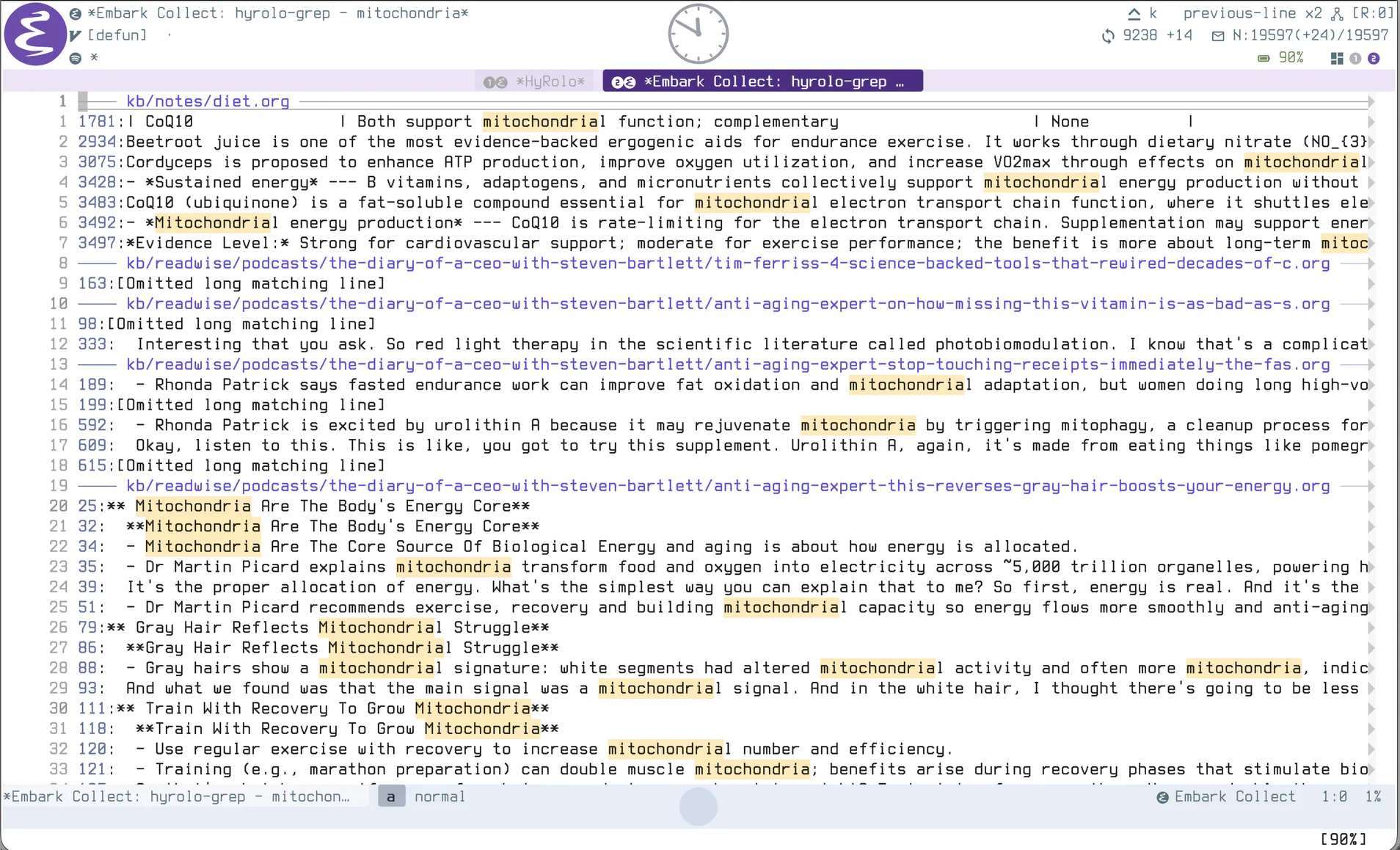
Figure 1: grep returns matching lines
With HyRolo, we see the full context (the tree) around each match.
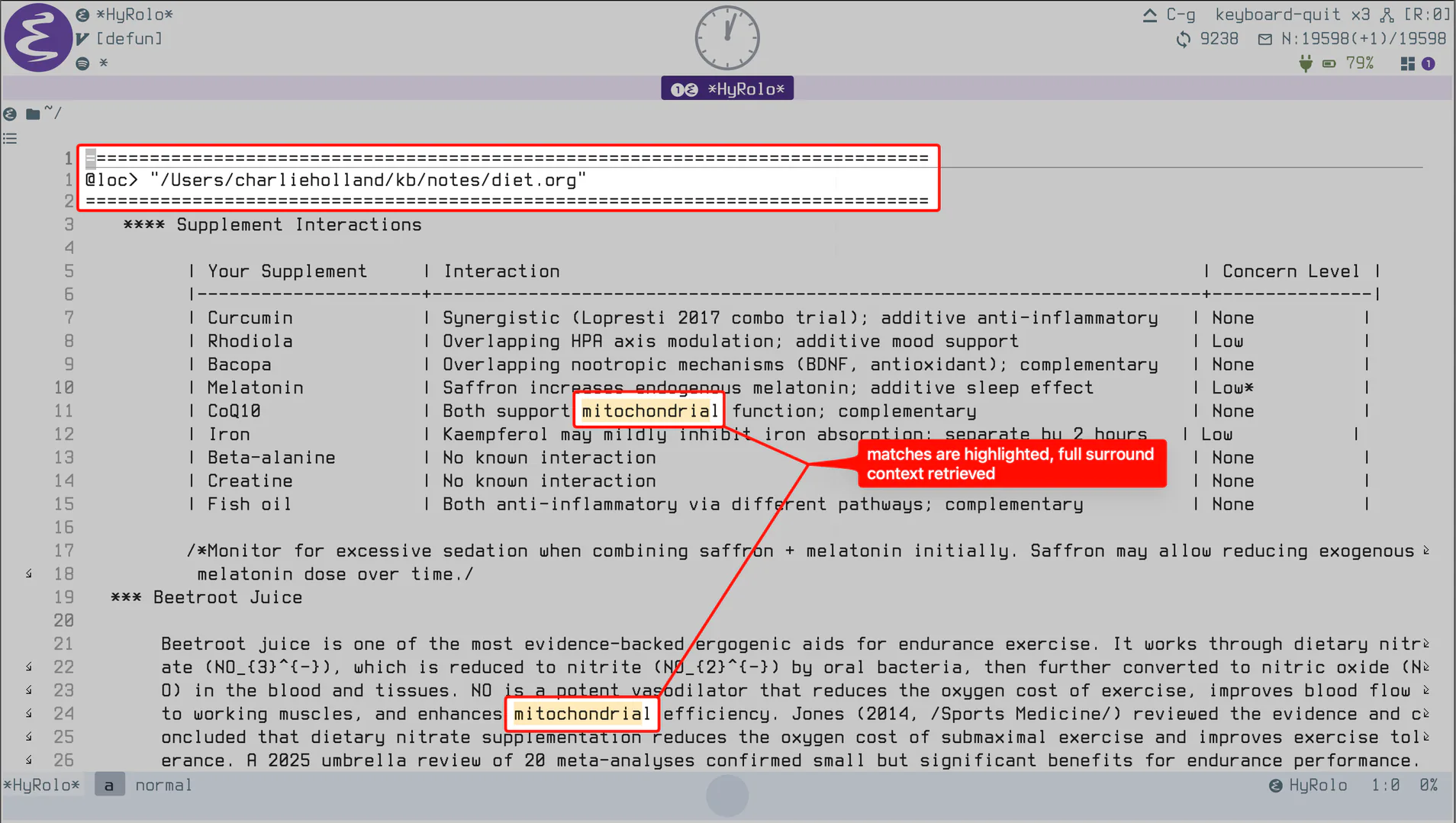
Figure 2: hyrolo-grep returns the full hierarchical records around each match
The *HyRolo* match buffer is itself a first-class, navigable outline. You can jump between matches, fold and unfold entries, and get an overview of just the headings. And because this is Hyperbole, the Action Key works in the *HyRolo* buffer. Press M-RET on any retrieved entry and it is displayed for editing in its source file buffer.
5. The Search Commands hyrolo retrieval
All of the retrieval commands live on the Rolo menu (C-h h r), or can be called directly:
| Command | Key | Finds entries containing… |
|---|---|---|
hyrolo-fgrep |
C-h h r s |
a string, or a boolean match expression |
hyrolo-grep |
C-h h r r |
a regular expression |
hyrolo-word |
C-h h r w |
whole-word matches only |
hyrolo-tags-view |
C-h h r t |
matching Org tags across your rolo files |
The last letter of each key selects the item from the Rolo menu by its label's initial: StringFind, RegexFind, WordFind, and TagFind.
hyrolo-word matches whole words, so searching for product won't drown you in mentions of production. And hyrolo-fgrep accepts full Lisp-like boolean expressions with and, or, xor, and not:
(and postgres (not migration))
The above query with hyrolo-fgrep retrieves every record that mentions postgres but not migration, across every file in your list. This can be a useful query language over your entire note corpus.
6. A Knowledge Graph Without the Graph hyrolo knowledgeManagement
This is how I use HyRolo most. This is also how I think about HyRolo abstractly: as a more practical alternative for knowledge-graph-style tasks.
Some quick terminology first: knowledge graphs are graphs in the data-structure sense, and they show up as ball-and-stick models. The balls are the 'nodes' and the sticks are the 'edges'. It's a simple yet powerful model, and most PKMSs use it.
The canonical knowledge-graph question: "show me everything connected to X". What's the answer?
Graph-oriented PKMSs provide this answer with a backlinks pane or a graph view, but only if you did the up-front manual labor of hand-authoring every 'node' as a hard-coded link, inside the tool's own vault. This answer is also quite sparse, usually just a list of node names or file names, stripped of the surrounding prose that actually defines the connection. I think of that surrounding prose as the 'edge type', an indispensable part of the knowledge graph.
hyrolo-grep answers the question with more detail and fewer requirements. Searching for a term retrieves every record it occurs in, across every file in hyrolo-file-list, into one *HyRolo* buffer, with the meaningful surrounding context right there. In this way, I get every piece of the knowledge graph I need (the node is the ad hoc input query, the connected nodes are the records in the *HyRolo* buffer, and the edge type is the surrounding prose in the record).
You can think of the *HyRolo* buffer as a sophisticated (but more practical) backlinks buffer, with the added benefit that you never need to hardcode the nodes or edges, as HyRolo displays these on the fly based on your input query. To emphasize, HyRolo can materialize "backlinks" for anything that can be matched with a regular expression.
This is the Hyperbole philosophy showing up again with HyRolo, and I'm glad to keep highlighting it in this series. Other systems make you author relationships before you can use them, whereas Hyperbole infers relationships when you ask for them. Implicit buttons infer them at the point of traversal, and HyRolo infers them at the point of retrieval. With HyRolo, mentioning a term in a note is the linking.
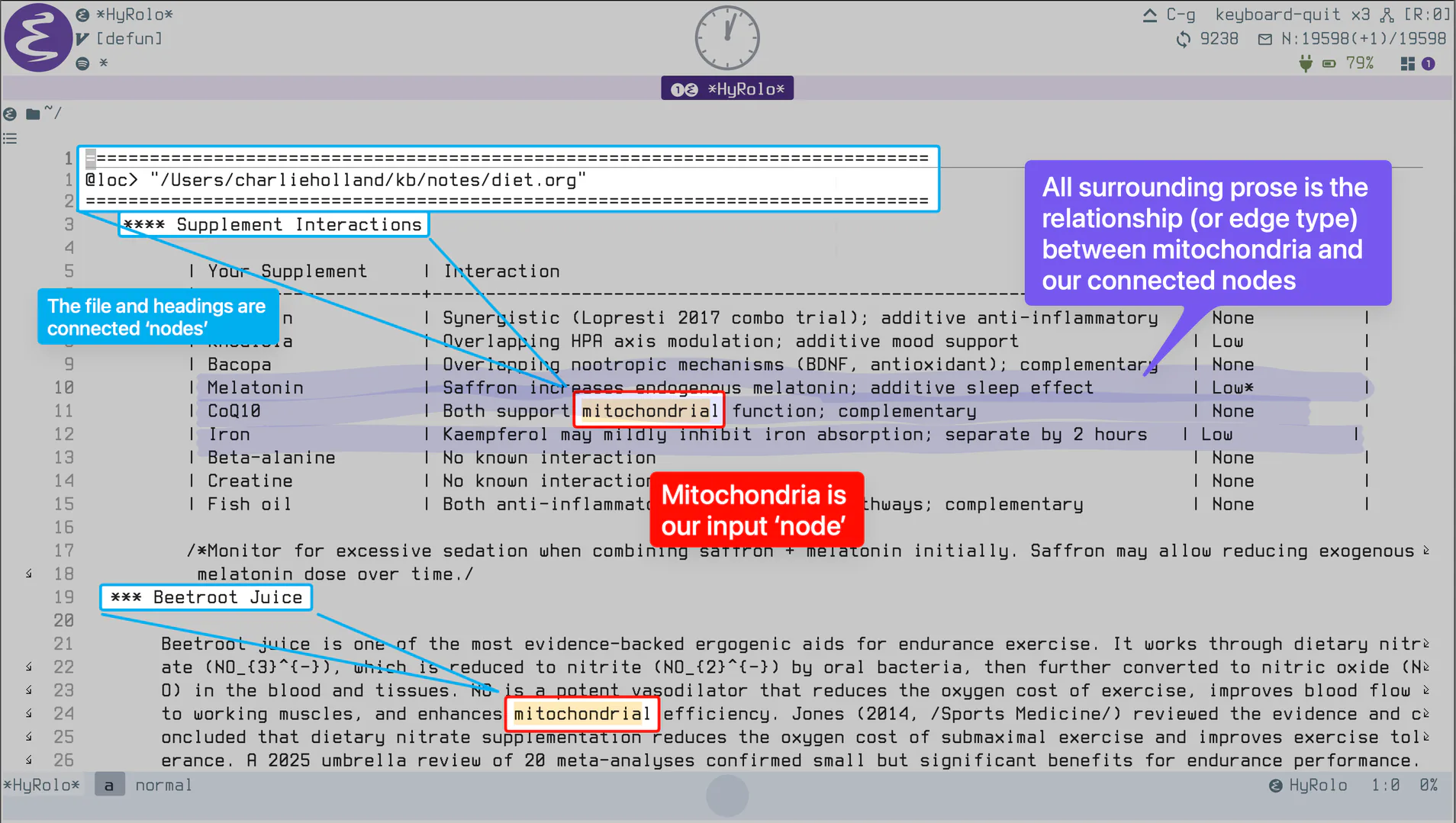
Figure 3: The *HyRolo* buffer behaves like a knowledge graph
7. Yes, the Name Means Rolodex hyrolo
The name HyRolo is important to address because it can be somewhat misleading.
HyRolo was originally written as a digital Rolodex™ for managing contact records, and it still supports that quite well. The default ~/.rolo.org file, automatic datestamps, alphabetized insertion, and a hyrolo-mail-to command all remain as features from when HyRolo functioned primarily as a digital contact management tool.
But it's important to emphasize here that contact management is just one application of HyRolo. It is a generic tool. The Hyperbole manual makes this clear:
Hyperbole includes HyRolo, a complete, advanced system for convenient management of hierarchical, record-oriented information. Most often this is used for contact management but it can quickly be adapted to most any record-oriented lookup task requiring fast retrieval. For example, you can look up glossary entries listed in Org file headlines or legal-numbered requirements from a Koutline file.
If you replace the word "contact" with "record", you get a better sense of HyRolo's reach. It is a generic hierarchical record retriever for any outline-structured text. A record is simply a heading plus its descendants (body text and recursive subsections).
Consider what instances of data can fit into this flexible type 'record':
- Notes
- READMEs
- Project logs
- Architecture Decision Records (ADRs)
- Glossary entries
- Recipes
- And, of course, contacts
These are all naturally hierarchical records. The vast majority of the Emacs community uses org-mode, and so the culture of writing everything down in record form is baked deeply into the philosophy of the modern Emacs user. You may use Markdown over org-mode, and HyRolo supports that as well. In a flexible, generic way, it can retrieve records from any hierarchical format.
8. Consult Previews, Embark Comparisons hyrolo consult
Usefully, HyRolo integrates with consult. hyrolo-consult-grep (and hyrolo-consult-fgrep) run your search through consult's live-updating minibuffer, so you can preview matches in place and refine your query before displaying a *HyRolo* buffer. Although the consult buffer highlights one selected candidate, all remaining candidates and their associated records show up in the Hyperbole *HyRolo* match buffer when you press RET.
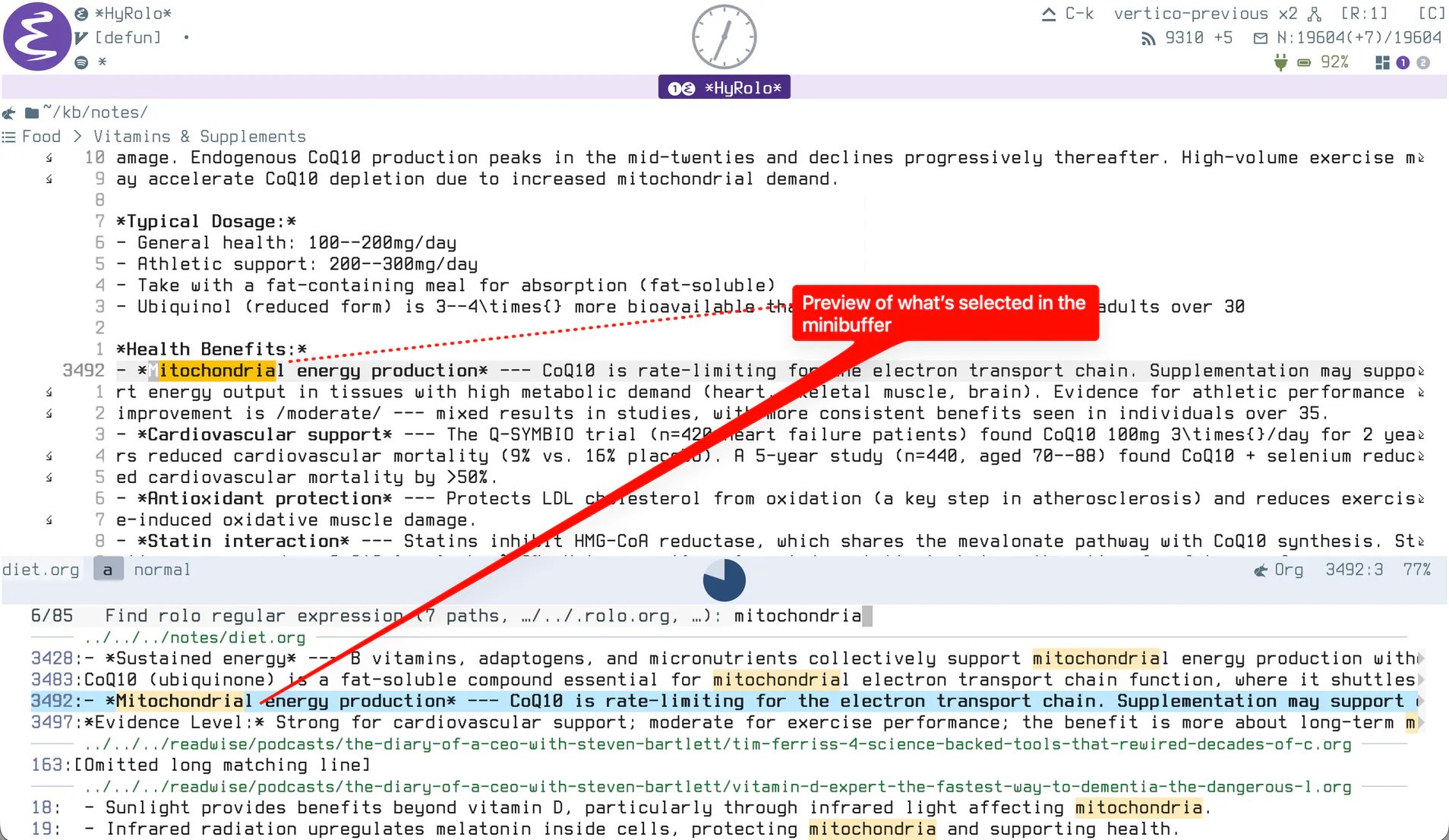
Figure 4: hyrolo-consult-grep: previewing matches through consult's live minibuffer before committing to a materialized *HyRolo* buffer
For embark users, here is the mental model I'd offer: hyrolo-grep feels like a consult-grep followed by an embark-export, giving you a persistent, navigable buffer of results. The key difference is that HyRolo is aware of hierarchical context. An embark export gives you a grep-mode buffer of matching lines, while HyRolo materializes the full records around the matches, nested structure intact, foldable as an outline, in their original formats. This doesn't obviate embark-export or embark-collect, by the way. I still use both frequently (for example, I use Embark for interactive 'find and replace' via consult-ripgrep -> embark-export -> wgrep-change-to-wgrep-mode).
9. Try It hyperbole
The install snippet from the first post is all the setup you need. Then tell HyRolo where your records live:
(setq hyrolo-file-list '("~/.rolo.org" "~/notes/" "~/org/*.org"))
Run M-x hyrolo-grep (or explore the Rolo menu with C-h h r ?) and search for a term you know is scattered across your notes (I bet "Emacs" would turn up a ton of matching records!). Fold the results, jump to a source with M-RET, then try a boolean query with hyrolo-fgrep.
10. Further Reading
The HyRolo chapter of the Hyperbole manual covers the concepts, menu, search commands, keys, and settings in full. The first two posts in this series, on HyWiki and implicit buttons, cover the traversal side of the hyperverse that HyRolo's retrieval completes.
Footnotes:
1
HyRolo recognizes the full family of Markdown suffixes: .md, .markdown, .mkd, .mdown, .mkdn, and .mdwn (see hyrolo-file-suffix-regexp in hyrolo.el).
2
Google Contacts are searched on each query when the google-contacts package is loaded (controlled by hyrolo-google-contacts-flag), and BBDB databases are searchable via hyrolo-bbdb-grep and hyrolo-bbdb-fgrep.
3
hyrolo.py ships in the Hyperbole package directory and provides a command-line version of HyRolo search, useful for scripting retrieval outside of Emacs.