HyWiki: Zero Markup Hypertext
Table of Contents
- 1. TLDR
- 2. About emacs hyperbole hywiki knowledgeManagement
- 3. Implicit Buttons: Emacs as a Hyperverse hyperbole implicitButtons
- 4. Minimum-Viable Syntax hywiki knowledgeManagement
- 5. The Omniscient Second Brain hyperbole hypertext
- 6. Your File System is the Knowledge Base knowledgeManagement hypertext
- 7. HyWiki Makes Writing More Valuable writing learning
- 8. Getting Started hyperbole
- 9. Further Reading
1. TLDR

A key feature is missing from most Personal Knowledge Management Systems (PKMSs): define a concept by pressing a keybinding on a word, and from then on all occurrences of that word become live, actionable links everywhere. This capability would transform your knowledge base from a siloed graph into an omniscient second brain. That is the unique feature of the HyWiki part of the GNU Hyperbole package for Emacs, a wiki whose only syntax is the HyWikiWord: a PascalCased word like Emacs or EmacsCompletion, without the link delimiters ([[ ]]) other PKMSs require.
Because a WikiWord is a Hyperbole implicit button, once defined it is highlighted and actionable in every text and programming buffer, not just inside a siloed notes vault. This lets you keep the messy majority of your notes as frictionless, markup-free text, promoting only the few broader concepts into formal nodes. The reduced friction HyWiki provides leads to more and better writing, and deeper understanding. This post also dispels the myth that Hyperbole is too deep to learn. In actual fact, it is useful the moment you install it, and Implicit Buttons and HyWiki are the two best places to start.
2. About emacs hyperbole hywiki knowledgeManagement
A plethora of PKMSs have come online over the last few years. Most of them give you a siloed container within which you author your notes with hardcoded links. These solutions ignore the critical reality that your entire file system is already a container of knowledge-bearing texts that naturally possess organic connective tissue in the form of implicit and explicit relationships.
Hyperbole's approach honors this reality and facilitates your knowledge traversal, annotation, and synthesis across the interconnected web of information that is already on your machine.
This is the first post in a series on Hyperbole, a package I think is immensely useful and often misunderstood. The misunderstanding is usually about depth. Hyperbole is extensive and turns your Emacs into a vastly capable personalized information environment (PIE)1. People assume Hyperbole's vastness means it is demanding, but I've found it has almost no adoption burden relative to other Emacs packages.
Like many of the best Emacs packages, it is useful the second you install it and asks almost nothing of you to begin using it effectively. You do not need to grok the whole Hyperbole system, and instead you can adopt it incrementally, one capability at a time.
The two best on-ramps, and the subjects of this post, are Implicit Buttons and HyWiki.
3. Implicit Buttons: Emacs as a Hyperverse hyperbole implicitButtons
Before HyWiki, we need to lay the groundwork with Hyperbole's most important concept: Implicit Buttons.
Hyperbole author Bob Weiner describes implicit buttons as "pattern recognizers across large text corpuses," and that phrase is worth analyzing, because it is the magic trick that transforms your Emacs from a big bag of text into an interconnected and navigable hyperverse.
An ordinary hyperlink is explicit. You must explicitly add markup, wrapping some text in specialized syntax (such as an <a href> or [[Org Link]]) so that some software knows it is actionable (or clickable). In contrast, an implicit button is a natural part of text with minimal syntax to type or distract your eye while reading. Any piece of text, marked up or not, can be an implicit button.
How? When you press the Action Key (M-RET by default), Hyperbole runs a cascade of context-sensitive recognizers over the plain text around point (your cursor) and asks: Does this look actionable? Things like a file path, a URL, a bug reference like fixes #43, a man-page name, a file-and-line-number, a WikiWord, or a programming symbol are all patterns, and each pattern carries an associated action. The combination of pattern and action creates an implicit button type that automatically recognizes matching buttons throughout your Emacs buffers.
So, the Action Key activates any implicit button at point and Hyperbole infers, from context, what the text is and what to do with it. This is similar to double-clicking a GUI button, but more powerful in concept because any text (and everything in Emacs is text) can be an implicit button. Ramin Honary, who gave a fantastic EmacsConf talk introducing Hyperbole2, drew an analogy I keep coming back to:
When you use a well-designed GUI, you can perform all sorts of different actions with just the left mouse click. […] every graphical element that you can click on in a GUI has its own executable command attached to it. There are always visual cues that indicate what behavior to expect when you click. This is the fundamental principle behind Hyperbole, but applied to textual elements, rather than graphical elements. The big difference is that a GUI uses geometric information about a 2D scene to decide what action a click will trigger, whereas Hyperbole uses textual pattern matching.
— Ramin Honary, Introduction to Hyperbole
A HyWikiWord, as it turns out, is just one of the implicit buttons that surfaces from this "textual pattern matching", which is why (once you let it loose with hywiki-mode set to :all), HyWiki turns your Emacs into a zero markup hyperverse. You simply write or download information and all your specified concepts are hyperlinked for free.
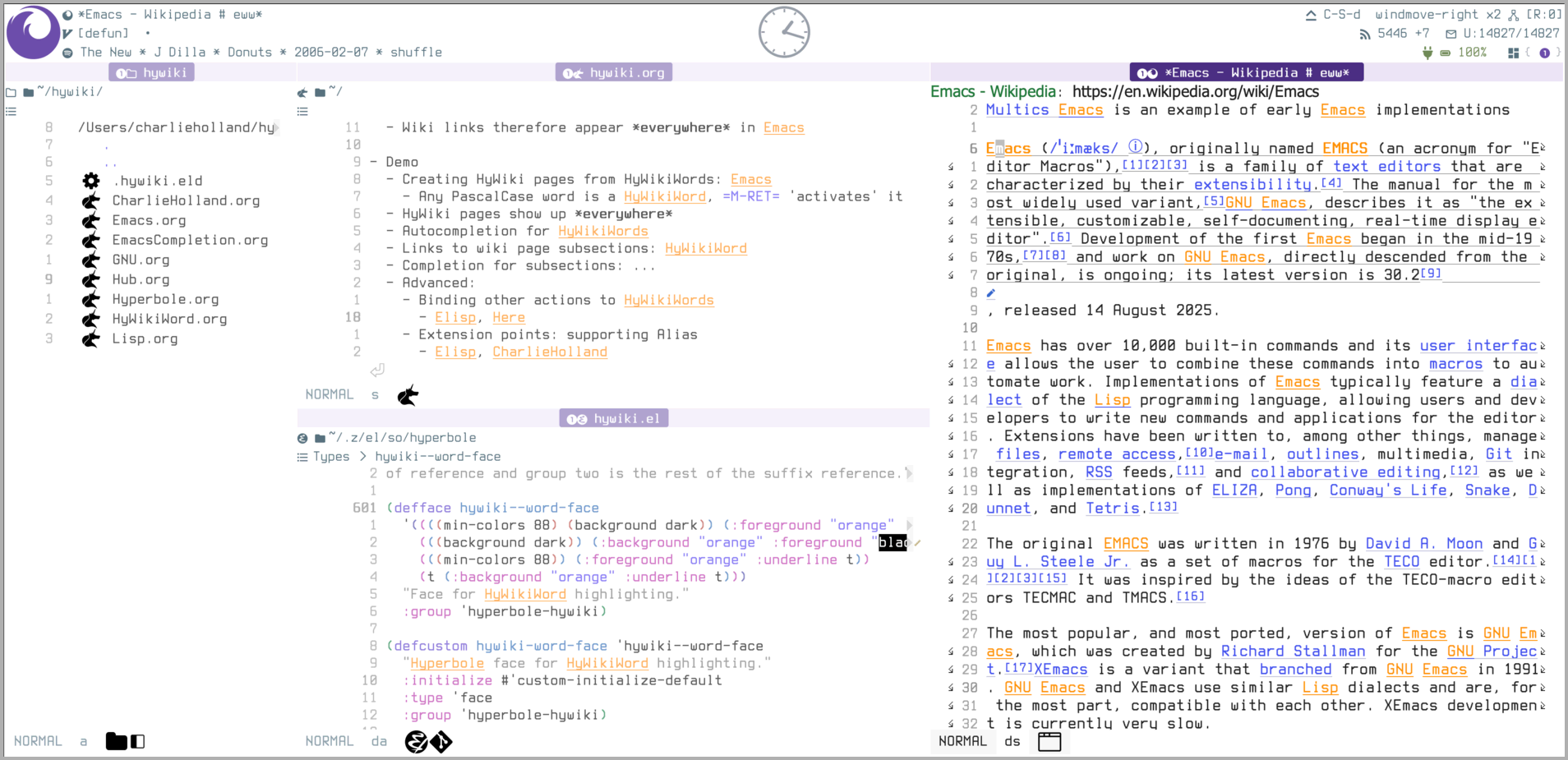
Figure 1: The zero-markup hyperverse: with ~/hywiki/ listed at left, the same HyWikiWords (Emacs, GNU, Lisp, and more) light up and become clickable across an Org notes buffer, the hywiki.el source, and a Wikipedia page rendered in EWW
Ramin clarifies these concepts in his post:
- First, "no markup language is necessary to create actionable text with Hyperbole". That's what I mean by zero markup.
- Second, because the recognizers run within Hyperbole's global minor mode, the behavior is available "everywhere, regardless of whatever other major or minor modes are active". That's what I mean by hyperverse.
4. Minimum-Viable Syntax hywiki knowledgeManagement
HyWiki is Hyperbole's wiki. A HyWiki page is an Org file living under hywiki-directory (~/hywiki by default), and a HyWikiWord is that page's name written in any buffer as a PascalCased word: Emacs, OrgMode, EmacsCompletion. This PascalCasing is the only syntax, so no hardcoded links, tags, ids, database indices, or anything else is required.
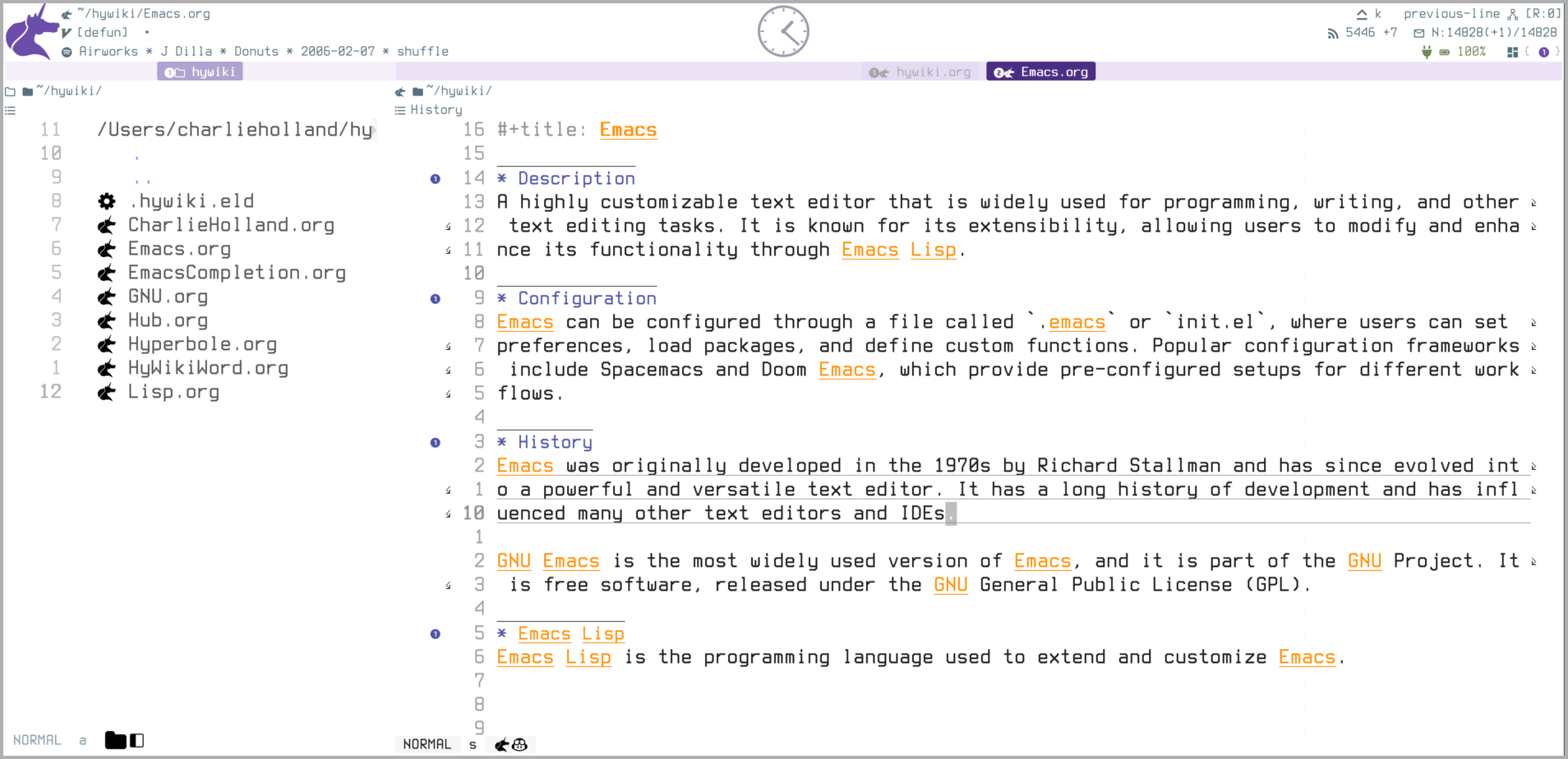
Figure 2: A HyWiki is just a directory of Org files. Left: ~/hywiki/ in Dired, one page per concept. Right: the Emacs.org page open, displaying live HyWikiWords like GNU and Emacs Lisp that jump to their own pages.
Once a HyWikiWord has a wiki page, any time you type it, it is immediately highlighted and active as a link to that page. You can even link to page sections by simply adding a # character, like Emacs#Description. More advanced users will find that HyWikiWords can even perform arbitrary actions, rather than linking to a page, just as all Hyperbole implicit button types can.
But how does this make HyWiki better than other PKMSs? It helps to see what HyWiki is not doing. In Obsidian, Logseq, and Org Roam, a link is [[Some Page][Visible Description]]. This can be distracting to read and it requires remembering the specific delimiter syntax that only resolves inside that tool. Worst of all, the overhead of manually linking your knowledge adds up with these other tools. With HyWiki, on the other hand, the PascalCase convention3 does all the work for you.
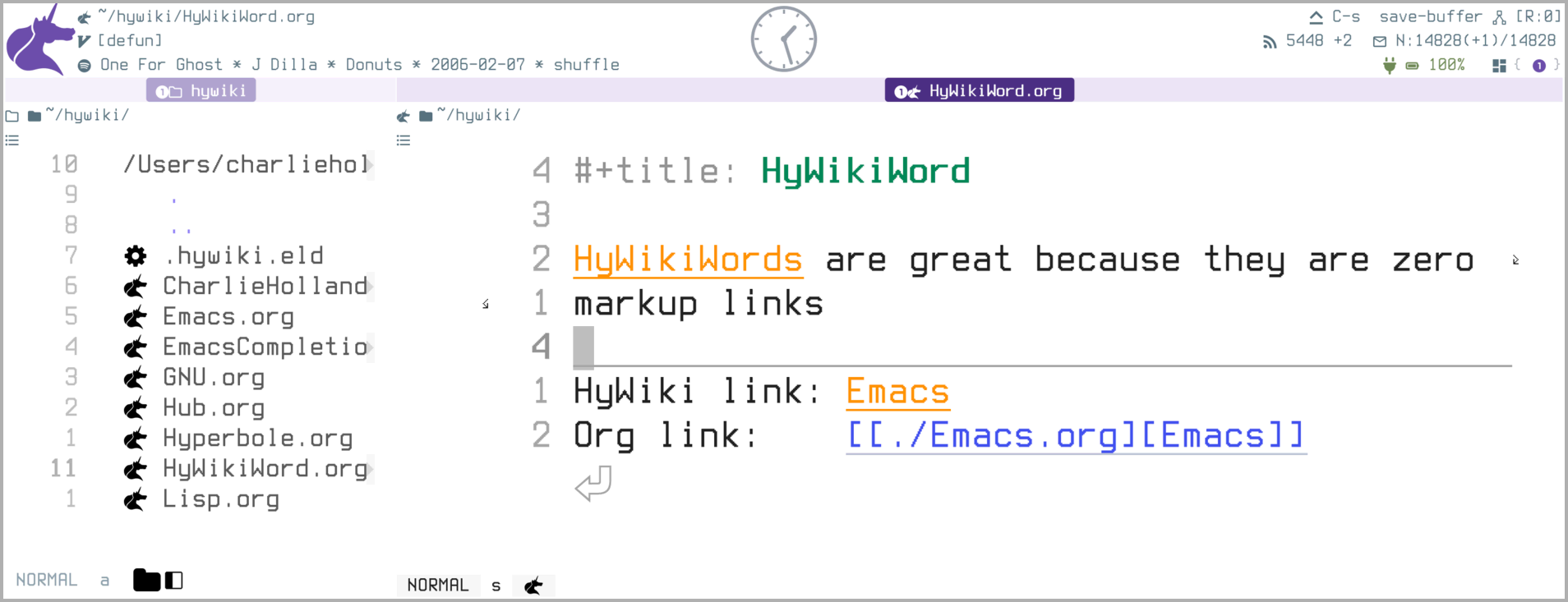
Figure 3: The bare HyWikiWord Emacs (top) is the same live link as the verbose Org syntax [[./Emacs.org][Emacs]] (bottom), minus the delimiters!
John Wiegley, the longtime maintainer of GNU Emacs, made this comparison in a 2019 note that Bob reposted to the Hyperbole list4:
Remember what Wikis did for plain text on a website? They were revolutionary at the time because they reduced the cost of associating information. Creating a link to a new page was as simple as ChangingCase, turning that word into a button you could click on to either visit the page, or create it if it didn't exist. So simple, yet it solved an important problem […]
— John Wiegley
This is exactly how Hyperbole's HyWiki works.
I love that the second I recognize something worth curating in my knowledge graph, a single keystroke promotes a word into a concept, so I can stay in the flow of typing and add associated notes later. Promotion is the right word to me, because the node's link syntax is the node's name, and so anywhere that word already shows up, it becomes highlighted and actionable, behaving similarly to a URL, but without the syntax.
Concretely, if I type Hyperverse and press M-RET, a fresh Hyperverse.org is created. From then on, wherever Hyperverse appears in Emacs, whether I type it into a buffer or whether it appears in a webpage, elfeed article, or email, it shows up as a live, actionable link.
5. The Omniscient Second Brain hyperbole hypertext
Once a WikiWord is defined, every occurrence of that word becomes highlighted and actionable. HyWiki propagates your knowledge curation in this way. You don't have to do the bookkeeping of linking those occurrences! Past, present, and future, your glorious new proper noun lights up everywhere. The HyWiki documentation explains:
HyWikiWords are also recognized in text buffers after the global minor mode, `hywiki-mode' is enabled via {M-x hywiki-mode RET}. To create or jump to a HyWiki page, simply type out a potential HyWikiWord or move point onto one and press the Action Key {M-RET}. This will create the associated page if it does not exist. This also highlights any other instances of HyWikiWords across all visible Emacs windows. HyWiki is built for scalability and has been tested to be performant with 10,000 HyWikiWords.
— Hyperbole documentation
This is the beating heart of Hyperbole's philosophy, and the source of the "hyperverse" framing.
To be fair to the competition, the notes themselves are not the problem. Obsidian is plain Markdown, and Org Roam and Denote are plain-text Emacs packages, so your files are yours in all of them. But two things stay locked inside each tool. The first is the link, because a wikilink or a node id only resolves inside that tool's own index and graph. The second is reach, because while those tools can surface unlinked mentions of a note, they can only do so in a sidebar, and only inside their vault. Hyperbole instead makes the concept itself live everywhere. This is one of the many ways that Hyperbole "brings your text to life".
Hyperbole's stroke of genius is that it treats all the information Emacs presides over as one arbitrarily interconnected space, and offers you a laborless mechanism to traverse the connective tissue that is already there. If other PKMSs offer you a 'second brain', HyWiki offers you an omniscient second brain.
I really like the way John Wiegley describes it:
Hyperbole […] should be thought of as an extensible "information enabler," automatically turning inert documents into active ones […] With every new recognizer and action you add, the more interactive all your information becomes. It's a multiplying effect, turning inert, standalone documents into more interactive, virtual semi-networks.
— John Wiegley
That multiplying effect John points out is the point of Hyperbole. A WikiWord you define while reading email is the same live link anywhere it later appears. Hyperlinking your world, to borrow one of Hyperbole's catch phrases, is not some sloganish metaphor, but rather a fulfilled promise; Hyperbole's literal behavior.
6. Your File System is the Knowledge Base knowledgeManagement hypertext
This is something I didn't fully register until talking to Bob, and is an important perspective shift for those who are used to other PKMSs.
If WikiWords are actionable everywhere, then what does everywhere become? Everywhere becomes your knowledge base, or at least, the knowledge-bearing information that will hydrate your curated wiki. This defies the common wisdom of the unfortunately siloed PKMSs.
- Capture from wherever you read. Once you notice
Emacsmentioned in an elfeed article, a mu4e message, or an EWW page, the Action Key promotes that into a curated WikiWord. - Connective tissue that spans applications. The same
Emacslink is visible and actionable in your prose, your code comments, Org agenda, mail, and (this is Emacs) anything you can imagine or build. - Bring Your Own Notes (BYON). Open your Obsidian or Logseq Markdown vault in Emacs with
hywiki-modeset to:all, and your WikiWords highlight there too, without the dreaded migration you would need to undertake to convert or integrate those with any other knowledge tool. HyWiki can function standalone or as a sidecar, riding alongside whatever you already use, andhywiki-directorycan sit wherever it suits you (even within your own knowledge base).
The sidecar arrangement is so fascinating to me, because it demonstrates that Hyperbole can act as a wrapper around other tools. Unlike other standalone PKMSs, Hyperbole functions as a global hypermedia mechanism for managing your knowledge.
While other PKMSs formalize everything in your notes repository as a node that adheres to their (very specific) schema, HyWiki lets you bring formalized nodes to your existing notes, leaving the notes themselves PKMS-naive, which is a beautiful outcome in the service of surfacing and managing knowledge.
Note that the HyWiki-as-a-sidecar usage pattern is the one that fits my workflow, but HyWiki is flexible about where it resides. The hywiki-directory can even be your siloed PKMS if you choose to operate that way. The value proposition of Hyperbole is the flexibility.
7. HyWiki Makes Writing More Valuable writing learning
There is a deeper reason I care about keeping the notes themselves frictionless, and it is about the more important writing process, over the less important bookkeeping or filing process that modern PKMSs espouse. After all, writing is a tool for thought.
Paul Graham puts the mechanism plainly: "writing about something, even something you know well, usually shows you that you didn't know it as well as you thought," and, more strikingly, "half the ideas that end up in an essay will be ones you thought of while you were writing it."5
Writing is not the transcription of finished thought, but rather where the thought gets finished. That is the constructivist view of learning. Knowledge is built and curated, not received, and we build it especially well while producing an external artifact6. And generating the words yourself, rather than merely reading them, is also what makes them stick7.
Using HyWiki together with (or instead of) the other PKMSs means the messy stuff gets to stay messy. This is important to me because oftentimes, the learning (or synthesis) doesn't happen when I take notes, but rather when my neurons re-wire. This happens passively during sleep, showers, breakfast, and actively in the curation of my chicken-scratch notes. HyWiki lets the stream of my consciousness flow freely onto the page, and then facilitates the curation of my notes when higher level concepts finally crystallize.
The friction a tool puts between you and the page is harmful. It is a diversion from the activity that actually produces intelligence and knowledge. Most PKMSs are surprisingly distracting here because, before you can write, you are asked to make the note a structured, first-class graph node. And if you want a backlink to show up elsewhere, you have to subsequently wire its connections by hand with link syntax. These context-switches to bookkeeping are cognitively expensive and a disservice to the writing process.
HyWiki removes that friction because it lets you write anywhere in plain text. When a real concept surfaces, you promote it to a curated concept (a WikiWord) with a single keypress, and then Hyperbole maintains the connections for you, forever, no markup required.
In my review of the many contemporary PKMSs, Hyperbole's HyWiki is the lowest-friction way to bootstrap your own intelligence through the precious and indispensable process of writing. It's interesting how HyWiki not only acts as a second brain, but also, by facilitating the process of writing, serves your primary brain as well.
8. Getting Started hyperbole
Running this code will install and configure Hyperbole and HyWiki. I recommend you add this to your init file.
;; add melpa to get the latest Hyperbole
(add-to-list
 'package-archives
 '("melpa" . "https://snapshots.melpa.org/packages/") t)

;; install Hyperbole from GNU ELPA-Devel
(use-package hyperbole
  :config
  ;; enable hyperbole-mode
  (hyperbole-mode 1)

  ;; enable hywiki-mode and make HyWikiWords appear everywhere
  (hywiki-mode :all)

  ;; For contexts where Hyperbole's {M-RET} Action Key is active,
  ;; make it override org-mode's built-in key binding
  (customize-save-variable 'hsys-org-enable-smart-keys t))
Then the Action Key (M-RET) immediately works on implicit buttons like HyWikiWords. Create your first HyWiki page by typing a capitalized word and pressing the Action Key on it.
Read the Hyperbole README and the HyWiki Manual for more information!
9. Further Reading
Hyperbole, originally created by Bob Weiner in 1989, predates the web, and was part of his Master's Thesis on Personalized Information Environments (PIEs) at Brown University.1
Also check out John Wiegley's Using Hyperbole: A Motivation and Ramin Honary's Introduction to Hyperbole, both quoted throughout this post.
Footnotes:
1
Robert Weiner, "PIEmail: A Personalized Information Environment Mail Tool", https://cdn.jsdelivr.net/gh/rswgnu/rsw_publications@a9813b7a/PIEs/PIEmail.pdf.
2
Ramin Honary, "Introduction to Hyperbole", tilde.town/~ramin_hal9001/articles/intro-to-hyperbole.html.
3
The convention predates the web's bracketed link syntaxes. The first wiki, Ward Cunningham's WikiWikiWeb, went public on 25 March 1995 and automatically turned any PascalCase word into a link to a page of that name, creating the page if it did not yet exist: "beginning with WikiWikiWeb in 1995, most wikis used pascal case to name pages." See Pascal case and History of wikis (Wikipedia).
4
John Wiegley, "Using Hyperbole: A Motivation", lists.gnu.org/archive/html/hyperbole-users/2019-01/msg00037.html. Wiegley is a longtime maintainer of GNU Emacs.
5
Paul Graham, "Putting Ideas Into Words", February 2022: paulgraham.com/words.html.
6
Constructivism: the view that learners actively build knowledge rather than receive it, traces to Jean Piaget. Seymour Papert's constructionism sharpens it to the claim that we learn especially well while building a sharable external artifact (Papert, Mindstorms, 1980). Writing is the most portable such artifact.
7
The generation effect describes that information you generate yourself is remembered better than the same information merely read. The classic delineation is Norman J. Slamecka and Peter Graf, "The generation effect: Delineation of a phenomenon," Journal of Experimental Psychology: Human Learning and Memory 4(6), 1978, 592–604.